People
BluSKY URL: https://blusky.blub0x.com/en-US/Person
Overview
People are the ones that utilize the access control system on a regular basis. One of the most powerful features of BluSKY is its ability to manage and control the various aspects of any Person in the system.
Use one of the links below to learn more about the Person View List
Overview
- How-To
- Guide Contents
Person List Features
Customizable Columns
The Person List is very customizable and can be tailored to your exact needs. Every system is different and we understand that we need to provide a flexible solution that can work for everyone. Below are some of the features that make our solution the best tool for the job.
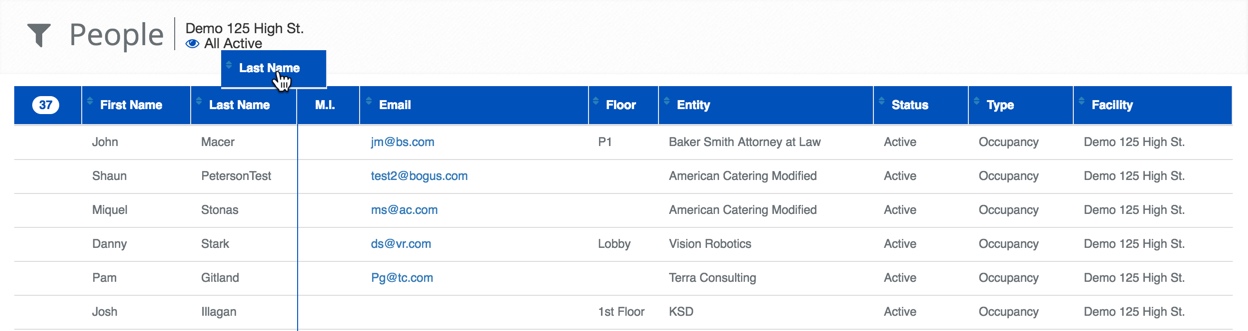
Rearrange Column
Click and drag any column to where you would like it displayed.
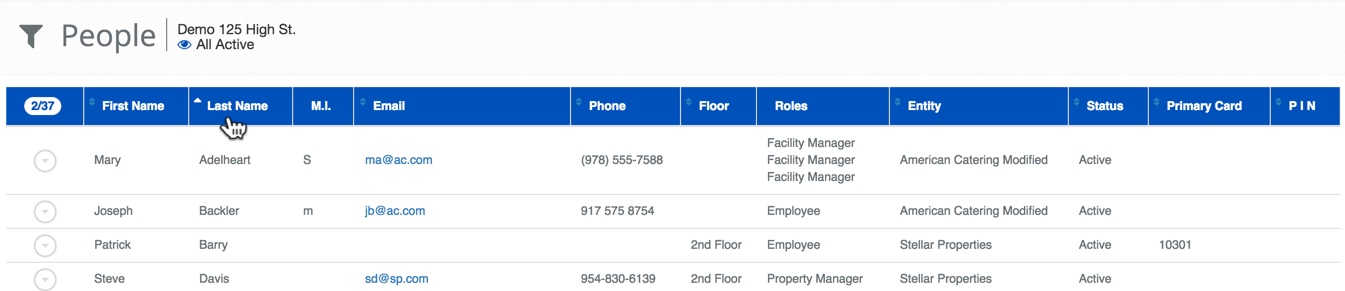
Order on Any Column
By clicking on the column header you can sort that column. Click once to sort, click again to reverse the sort. Please note, at this time you can only sort on a single column at a time. The white chevron indicates which column is sorted and how.
Person List Definitions
| Name | Description |
|---|---|
| Last Name | The person's last name. |
| First Name | The person's first name. |
| M.I. | Middle initial. |
| Employee # | A number assigned by the employer for an employee. |
| Primary Card | The primary Card number of the user. |
| Contact Info | The preferred way to contact the user. |
| Primary Role | The Role assigned to the user. |
| System | The name of the access control system. |
| Facility | The name of the physical building associated with the System. |
| Company | Name of the Company. |
| Floor | The floor the person is assigned to. |
| Gender | The gender of the person |
| Start Datetime | Date and time when this access should be started. This is not to be confused with the device or access schedules. |
| Stop Datetime | Date and time when access should end. This is not to be confused with the device or access schedules. |
| Access Suspended | Whether or not the person's access rights have been suspended. |
| Suspension Start | When a suspension will start or has started. |
| Suspension End | When a suspension will end. |
| Login Suspended | If access to BluSky has been suspended. |
| Web Suspension Start | When access to BluSky was or will be suspended. |
| Web Suspension Stop | When access to BluSky will be or has been restored. |
| Date Inserted | The date this entry was added to BluSky. |
| Inserted By | The name of the login who created this entry in BluSKY. |
| Date Updated | The date this entry was last updated. |
| Date Deleted | The date this entry was disabled or deleted from BluSky. |
| Deleted By | Name of person who disabled this entry. |
People Setup Actions
 | Will bring you to the create screen. Use this if the entity does not exist in the BluSKY database. Be extremely careful not to create duplicates with slightly different names. |
 | View will bring you to the view screen. Use this to look up information on existing entities and access Audit Info. |
 | Edit will enable you to edit the selection you chose. |
 | Delete allows for removal of the entity from the BluSKY database. |
 | The Access feature allows an authorized Person the ability to modify many people's access rights without having to navigate to the individual records. |
 | Export will save the information from the view list into one of three file formats, a printable form or copying to your computers clipboard. Read more here. |
Search Criteria
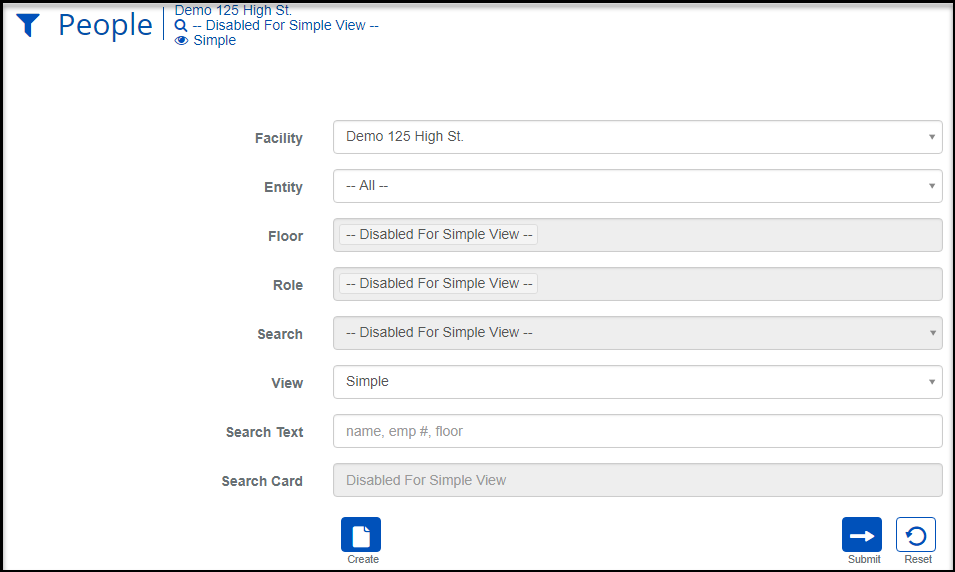
| Name | Description |
|---|---|
| Facility | The physical building the Person belongs to. |
| Entity | Name of the Company. |
| Floor | The floor or floors. |
| Role | A collection of permissions granted to a Person. |
| Search | Select the pre-selected filter to look at very specific slices of people data. |
| View | View will bring you to the view screen. Use this to look up information on existing entities and access Audit Info. |
| Search Text | This field is used to limit the number of rows listed in the list box below. To use simply type a string of characters or words. Please note you will only see those items you have the permission and access rights for. It is a good idea to search first, even when you are creating a new entry. |
| Search Card | Search for a Persons Card Number. |
| Create | Will bring you to the create screen. Use this if the entity does not exist in the BluSKY database. Be extremely careful not to create duplicates with slightly different names. |
| Submit | This button performs a search based on the criteria selected in the filter. |
| Reset | This button clears all fields in order to start a new search. |
View Options
We have provided you with some pre-configured views to get started. Each one of these views can be used or modified depending on your need. The pre-configured views are here for your convenience, feel free to further customize the view as you desire by rearranging or hiding the columns. Below are a few examples of these pre-configured views.

View Options
Simple - The fastest and minimal number of columns. Disables other search filter criteria.
All: Shows all columns, so takes the longest to populate.
Basic: Very few columns.
Standard:
Extended:
Example Views
SimplePeople List Simple Listing.png
Basic

Standard

Access Control
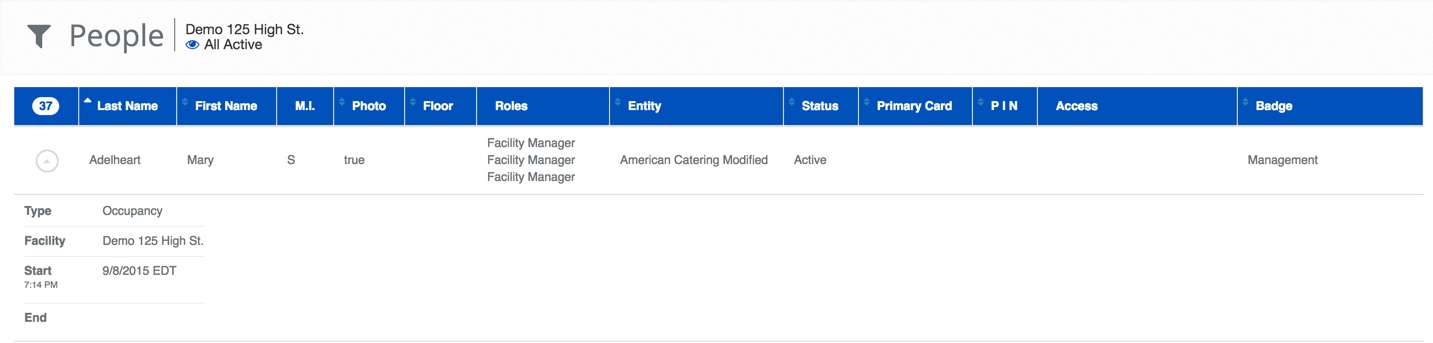
Access Control:
Contact Info:
Photo-ID:
Access Audit:
Record Audit
Custom: