Delegates Report
BluSKY URL:https://blusky.blub0x.com/en-US/DelegatesReport
Overview
This report will detail all of the points delegated to other Customer/Occupant or Vendors. This report can be used to ensure that certain points are only delegated to the desired recipients.
Output
Screen Shot 2021-05-05 at 6.02.49 PM.png
Video
Step by Step
Create Delegates Report
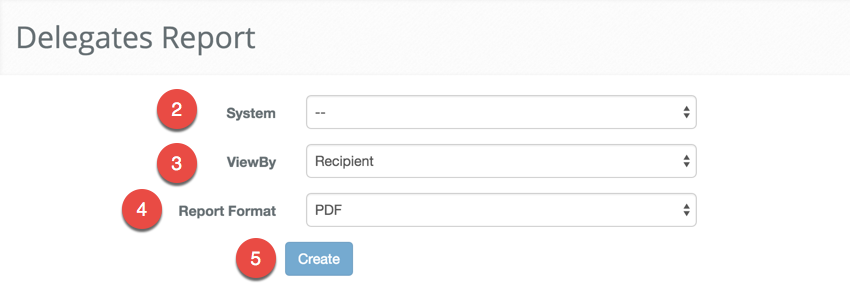
- Log in and navigate to Delegates Report. Main Menu-> Reports-> Delegates Report
- Select the System from the system drop-down menu.
- Select how you want to organize the report with the View By drop-down menu, either by Point or Recipient.
- Note: The information will be exactly the same just arranged in a different order.
- Next, select the format you want the report in, either PDF or Excel spreadsheet.
- When finished use the
 button to generate the report.