Edit Facility Floors
BluSKY URL:https://blusky.blub0x.com/en-US/Building/EditBasicInfo
Overview
Editing the Floors of a Facility is an important task when configuring a system to be used for elevator access control. This article guides you through process of changing and editing the Floors of a Facility.
Add Floors to a Facility
- Navigate to Facility, Main Menu-> Setup-> Facilities and Customers-> Facility
- Use the search feature and select the entry you wish to edit from the list.
- Click the on the
 button in the lower left hand side.
!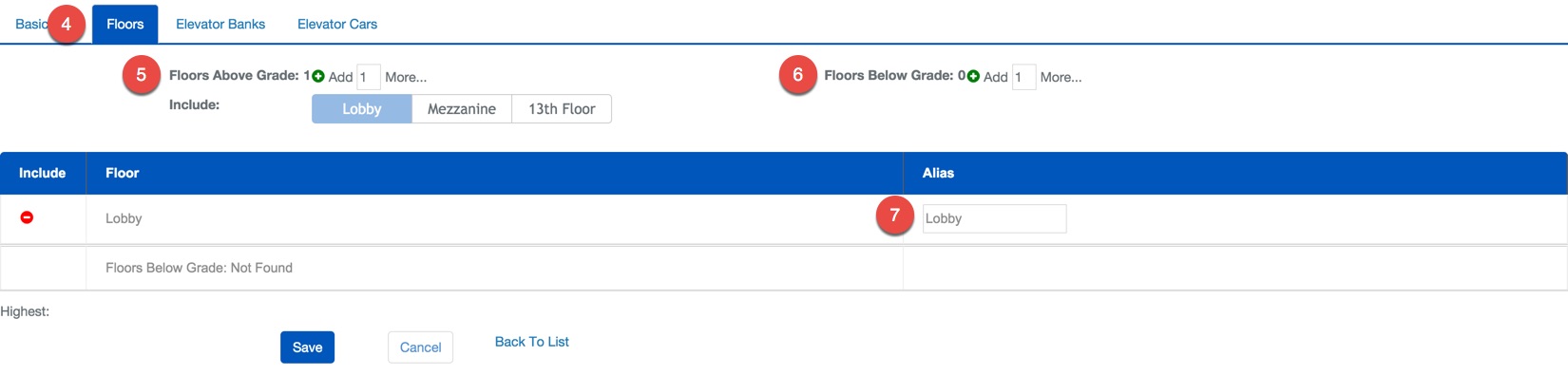
- Use the tabs at the top of the screen to select Floors.
- Select how manyFloors Above Ground and commit changes with the
 icon.
icon. - Select how manyFloors Below Ground and commit changes with the icon.
- ***Note:***It is important to properly add the floors to above or below ground.
- If you wish you may designate an Alias to each floor.
- Confirm changes with the
 button.
Delete a Floor from a Facility
- Navigate to Facility, Main Menu-> Setup-> Facilities and Customers-> Facility
- Use the search feature and select the entry you wish to edit from the list.
- Click on the button in the lower left hand side.

- Use the tabs at the top of the screen to select Floors.
- Scroll down to the floor you wish to delete and use the
 icon to remove the floor.
 - Confirm changes with the button.