Vendor Invitation
Whenever a Vendor is going to be on-site it is best to notify building of the visit in advance. This is done through a Vendor Invitation. Scheduling the visit can make sure that necessary personnel is available to assist and that the employees of the Vendor are able to get into the building quickly and perform their duties.
- How-To
Search Criteria
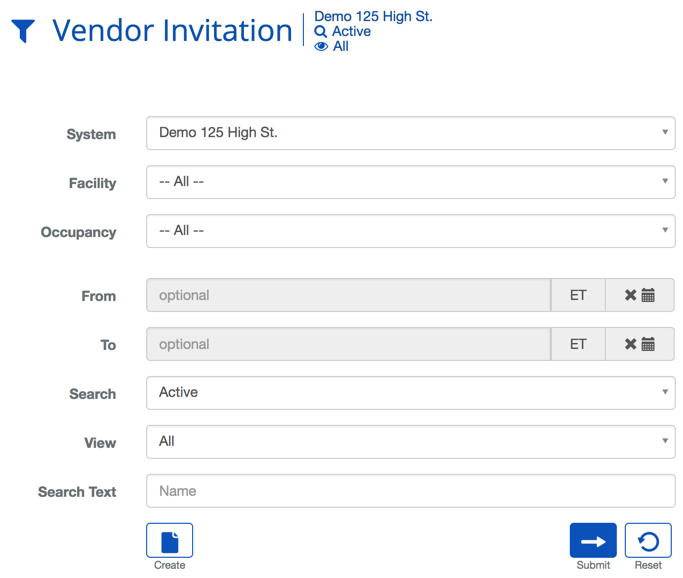
| Criteria | Description |
|---|---|
| System | Choosing a System will filter the results in the list to only the selected System. |
| Facility | Choosing a Facility will filter the results in the list to only the selected Facility. |
| Occupancy | Choosing an Occupancy filters the results in the list to only that selected Occupancy. |
| From | When a date is selected it will limit the result to only include Vendor Invitations after that date. |
| To | When a date is selected it will limit the result to only include Vendor Invitations before that date. |
| Search | This field specifies which types of records will be shown, All, Deleted or Active + Deleted. |
| View | The view setting allows you to select different ways to view the list. For this list there are two options, All or Custom. |
| Search Text | This field is used to limit the number of rows listed in the list box below. To use simply type a string of characters or words. |
Vendor Invitation List Definitions
| Name | Description |
|---|---|
| Vendor Employee | The name of the expected Vendor. |
| Vendor Company | The name of the Vendor's company. |
| Employee Email | The email of the visiting Vendor. |
| Employee Phone | The phone number of the visiting Vendor. |
| Requested By | The person that has requested the Vendor to come on site. |
| Visit Date/Time | The time and date of the Vendor's visit. |
| Visitation Pattern | The repetition pattern of the Vendor's visits. |
| Host Name | The name of the person who is expecting the Vendor. |
| Host Company | The name of the company expecting the Vendor. |
| Requested By | The person who made the Vendor request. This may or not be the same as the Host Name. |
Vendor Invitation Definitions
| Name | Description |
|---|---|
| Host | The name of the person who is expecting the Vendor. With the Vendor Invitations For Others permission you are able to make a request for another person. |
| Vendor Company | The name of the Vendor's company. |
| Vendor Service | The type of service the Vendor provides. |
| COI Information | Information on the status of the Certificate of Insurance (COI) for the Vendor. |
| Vendor Employee | This selection provides three options: - AdHoc - The name of the Vendor is available but not already in the system. - Vendor Employee - Allows you to select a Vendor employee already in the system. - Unknown - The name of the Vendor employee is unknown or not needed |
| Employee First Name | The first name of the visiting Vendor employee. |
| Employee Last Name | The last name of the visiting Vendor employee. |
| Employee Email | The email of the visiting Vendor. |
| Employee Phone | The phone number of the visiting Vendor. |
| Visit Date/Time | The time and date of the Vendor's visit. |
| Message | A blank text field to provide a message to the person admitting the Vendor. |
| Access | The Access Level the Vendor will be given when they arrive. |
| Visitor Type | Indicates whether the Vendor is making a Delivery or performing work in the building. |
| Floor Selection | |
| Facility | The Facility where Vendor has permission to work. |
| Floors | The Floors to be printed on the badge of Vendor. This does not effect access to that floor in any way. |
Vendor Invitation Setup Actions
 | Will bring you to the create screen. Use this if the entity does not exist in the BluSKY database. Be extremely careful not to create duplicates with slightly different names. |
 | View will bring you to the view screen. Use this to look up information on existing entities and access Audit Info. |
 | Edit will enable you to edit the selection you chose. |
 | Delete allows for removal of the entity from the BluSKY database. |
 | Export will save the information from the view list into one of three file formats, a printable form or copying to your computer's clipboard. Read more here. |