Visitor Invitation
BluSKY URL:https://blusky.blub0x.com/en-US/VisitorRequest
Overview
The creation of Visitor Invitations takes only a few clicks from you in BluSKY, but it greatly reduces processing time when they arrive in the lobby. A pre-registered visitor can be processed in just 20 or 30 seconds, but it may take several minutes to process one that is not. So pre-registration is surely a welcoming gesture for your visitors, and one that they will appreciate.
Search Criteria
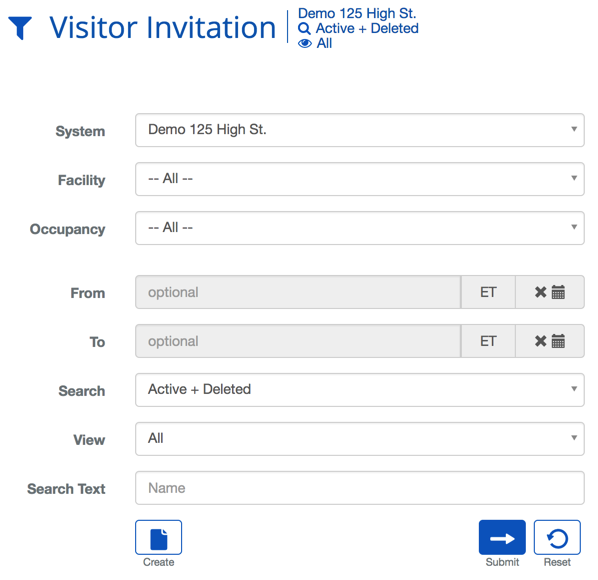
| Criteria | Description |
|---|---|
| System | Choosing a System will filter the results in the list to only the selected System. |
| Facility | Choosing a Facility will filter the results in the list to only the selected Facility. |
| Occupant | Choosing an Occupancy filters the results in the list to only that selected Occupancy. |
| From | When a date is selected it will limit the result to only include Visitor Invitations after that date. |
| To | When a date is selected it will limit the result to only include Visitor Invitations before that date. |
| Search | This field specifies which types of records will be shown, All, Deleted or Active + Deleted. |
| View | The view setting allows you to select different ways to view the list. For this list there are two options, All or Custom. |
| Search Text | This field is used to limit the number of rows listed in the list box below. To use simply type a string of characters or words. |
Visitor Invitation Definitions
| Name | Description |
|---|---|
| Affiliation | The company associated with the Visitor. |
| Guest Email | Contact email for the the Visitor. |
| Guest Name | The name of the Visitor. |
| Guest Phone | Contact phone number for the Visitor. |
| Host Company | The Company of the Host. |
| Host Name | The Person who is making the Visitor Request. |
| Requested By | The name of the Person making the Visitor Invitation. |
| Visit Date/Time | The expected date and time of the visit. |
| Visitation Pattern | This will specify how often the Visitor is expected. |
Visitor Invitation Actions
 | Will bring you to the create screen. Use this if the entity does not exist in the BluSKY database. Be extremely careful not to create duplicates with slightly different names. |
 | View will bring you to the view screen. Use this to look up information on existing entities and access Audit Info. |
 | Edit will enable you to edit the selection you chose. |
 | Delete allows for removal of the entity from the BluSKY database. |
 | Expand adds additional columns to the Integrator information displayed on the List page. The icon now displays as Shrink. |
 | Shrink restores the List page to its original column display. |
 | Export will save the information from the view list into one of three file formats, a printable form or copying to your computers clipboard. Read more here. |