Intercom
-
Background
-
There are three different "types" of intercoms that need to be accommodated:
-
Physical intercoms that are deployed in the field - we'll refer to these as client intercoms
-
A virtual intercom that is manned by a security officer - we'll refer to these as master stations
-
A virtual intercom that is created on-the-fly by anyone having permissions to call a client intercom from a location other than the security desk - we'll refer to these as virtual intercoms
-
Configuration
-
Need to add a Module
-
Module configuration to include:
-
If intercom system supports video
-
Outbound audio/video costs BluBØX money due to charges incurred by the datacenter.
-
Billing model - .10/call
-
Need to research if this still works when including outbound video from Guard/Master Station back to client intercom
-
Plus one time fixed cost 125/channel
-
Need to control who is able to use Virtual Intercom functionality
-
This will be done via a permission - it will be "Can use Virtual Intercom Functionality" with a boolean type of permission.
-
If you have the permission in "any" scope, AND you can see the intercom (see below), then you can call that intercom from your pc/phone/etc
-
Need to control who is able to see which Master Stations
-
We are not doing this with our permissions model because it is not granular enough
-
We will implement controlling which master stations you see based on explicit grants.
-
There will be a tab added to the Persons screen or possibly a new dedicated screen that allows you to assign master stations to a person (similar to assigning Readers to a person). This table will be called PersonsIntercoms (master stations are just intercoms with IsMaster true and IsVirtual true)
-
Need to control who is able to see which intercoms
-
We are not doing this with our permissions model because it is not granular enough
-
We will implement controlling which intercoms you see based on explicit grants.
-
There will be a tab added to the Persons screen or possibly a new dedicated screen that allows you to assign intercoms to a person (similar to assigning Readers to a person). This table will be called PersonsIntercoms (client intercoms will have IsMaster = false and IsVirtual = false)
-
Need to add/edit/view/delete intercom servers - BluBØX only as we will incur additional datacenter costs.
-
Need UI to add/edit/view/delete intercom devices
-
Need to support multiple SIP-based manufacturers, including :
-
Person Reader
-
Axis Door Station
-
2N
-
Need to capture capabilities of intercom
-
Include video - this should come from metadata we have based on the model
-
If video, what framerate, etc. - this can't come model-specific metadata as it will vary from device to device based on preference.
-
IP Address and Port of the SIP Server.
-
Whether or not there is an addressable output
-
If so, special command formatting, etc.
-
Username, password, host, etc.
-
Username is the extension in the SIP world, so by controlling passwords for the usernames(extensions), we can multi-tenant a single SIP server across multiple real-world customers.
-
Secure SIP?
-
Need to capture if the "intercom" is physical or virtual (this will be the case for Master Stations)
-
Need to capture if the "intercom" is a Master Station (it is possible that physical master stations will be in the mix beyond our virtualized ones).
-
Consider custom ringtone choice for each extension
-
Would help to distinguish between normal intercoms and the Emergency "blue light" intercoms audibly when the session is initiated
-
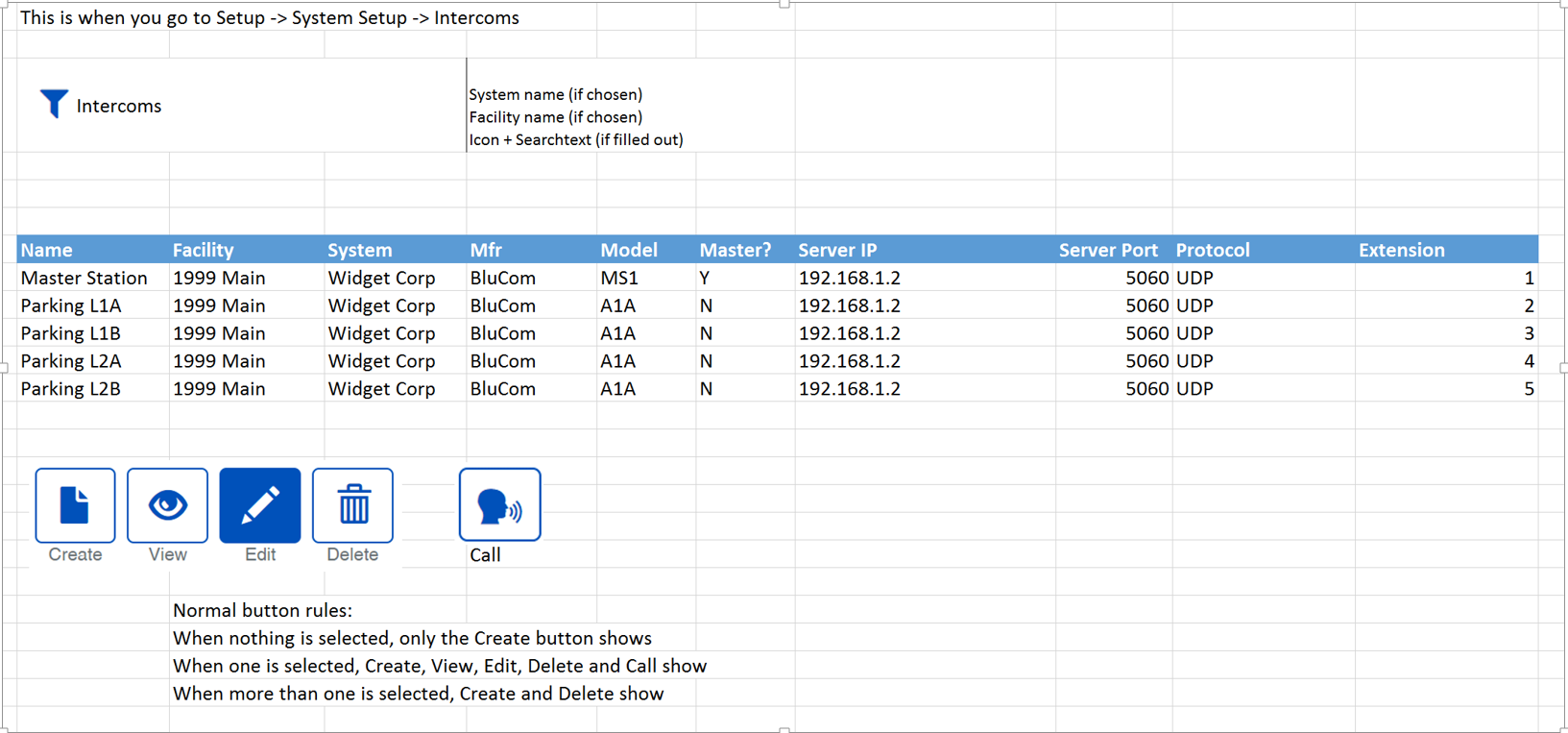
View List:
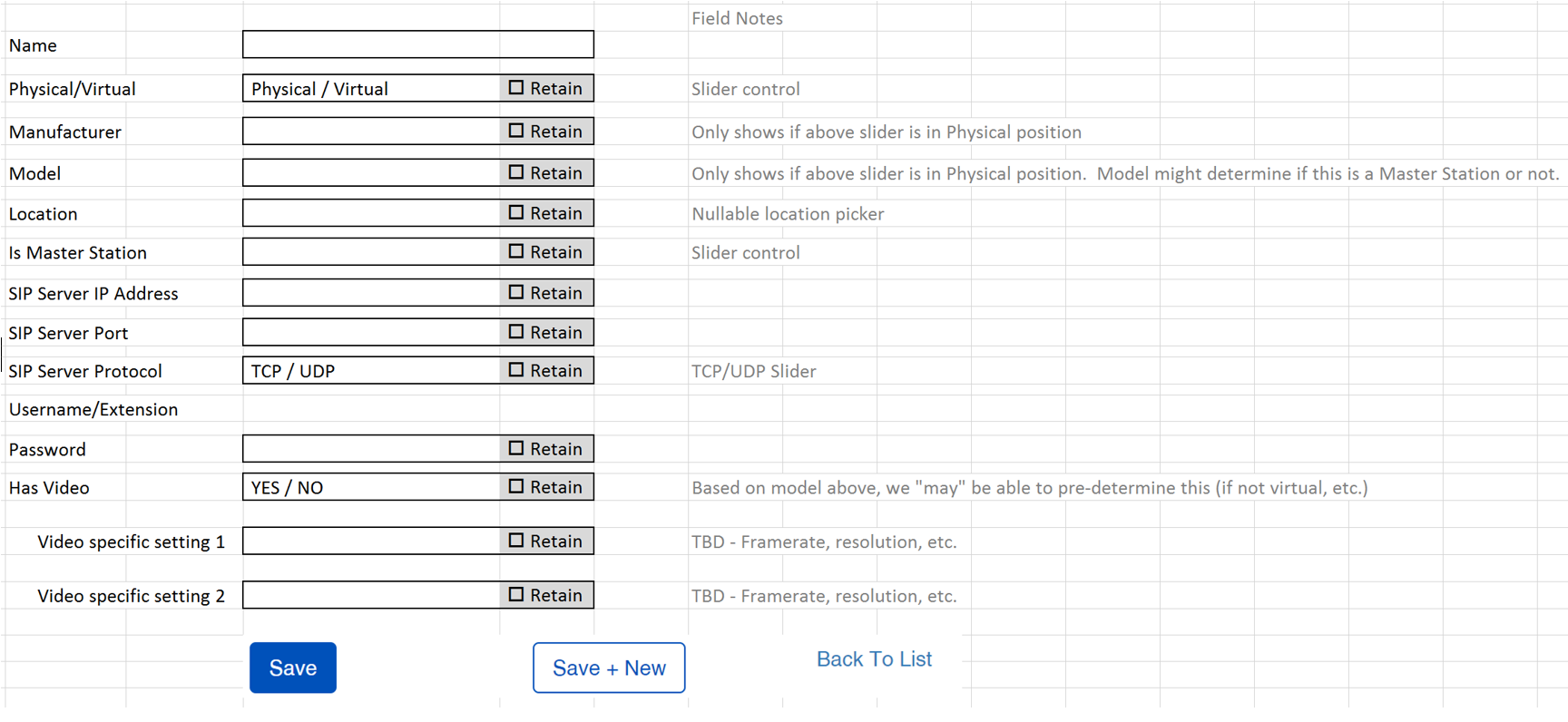
- Fields for add/edit screen:
-
Need to research if we can use above information to configure the device itself via SDK
-
Not a problem for the BluBØX Person Reader
-
Camera in intercom is NOT set up as a camera in our cameras table.
-
Camera in BS is reserved for when the camera is being used as a Camera streaming to an NVR, etc.
-
Otherwise, it is an attribute of the Intercom object (yet to be created).
-
Realtime Interaction
-
Need software-based Master station
-
Need to show via Red/Green light if the Master Station has good connection to VOIPNow/FreeSwitch server in Azure
-
May include ability to leave voicemail at Master Station, but probably not at extensions even though it is technically possible
-
Two aspects:
-
Inbound
-
Displays list of both Active and Incoming sessions
-
"Incoming" sessions will ring with their appropriate configured ringtone and will show in flashing red?
-
Ongoing sessions will show as green
-
Ongoing sessions will have a "hold" button in case you need to switch to another ongoing or "incoming" session. Replaces with "resume" button once clicked.
-
Hitting an incoming call while speaking to an ongoing call will result in dialog: hang up or put on hold?
-
Outbound
-
UI for this needs to look at your permissions and determine what devices you can connect to.
-
Needs a "intercom picker" UI
-
Based on the configuration of each device we know whether or not to show video
-
Outbound calls will also have a "hold" button that changes to "resume"
-
History/Terminated Sessions List
-
Shows as grey - for a session that either was not answered in time or was answered but is no longer active
-
Has a "call back" button/link
-
Need to capture full costs including data outbound (of guard to client)
-
Do we want to store (in Azure) the full session (audio and/or video)?
-
Random Notes
-
We should explore two models:
-
SIP Server in the Cloud (current above spec)
-
SIP Server locally
-
Problem is, you can't use this outside of the site. So it limits use to only computers/laptops/phones/intercoms that are on the same network (ie, BluSKY in general can't reach it).
-
Look into other Intercom solutions:
-
Look at common intercom functionality
-
Look at third-party software interfaces to their hardware.
-
Look at MXButterfly (virtual PBX)
-
Look at how various verticals use Intercoms - schools versus hospitals, vs other
-
Person Reader:
-
RealSense Sensor supports multiple streams from multiple processes simultaneously
-
Can do standalone Intercom module that supports video and audio through latest SIP Spec
-
Master station side - there's a pure Javascript implementation of SIP library
-
Can install FreeSwitch or VOIPNow on a VM in Azure or use a pre-built machine (prebuilt is around .10 to .86/hr and handles 40 sessions at once)
-
Links to SIP Servers:
-
FreeSwitch SIP server [https://freeswitch.org/](https://freeswitch.org/\\)
-
[https://aws.amazon.com/marketplace/pp/B0191S5CU4](https://aws.amazon.com/marketplace/pp/B0191S5CU4\)
-
VOIPNow SIP Server
-
[https://azuremarketplace.microsoft.com/en-us/marketplace/apps/4psa.voipnow?tab=PlansAndPrice](https://azuremarketplace.microsoft.com/en-us/marketplace/apps/4psa.voipnow?tab=PlansAndPrice\)
-
[https://azuremarketplace.microsoft.com/en-us/marketplace/apps/4psa.voipnow?tab=Overview](https://azuremarketplace.microsoft.com/en-us/marketplace/apps/4psa.voipnow?tab=Overview\)
-
Javascript SIP Library:
-
C# Library
-
[https://sipsorcery.codeplex.com/](https://sipsorcery.codeplex.com/\)