Creating an SIO Board
Overview
SIO Boards are used to increase the number of Inputs, Outputs and Readers the the access control system can manage. We discuss how to configure BluSKY to communicate with the different SIO Boards making up the System.
Instructions
- Log in and navigate to SIO Boards. Main Menu-> Setup-> System Setup-> SIO Board
- Use the
 icon in the lower-left side to create a new SIO Board.
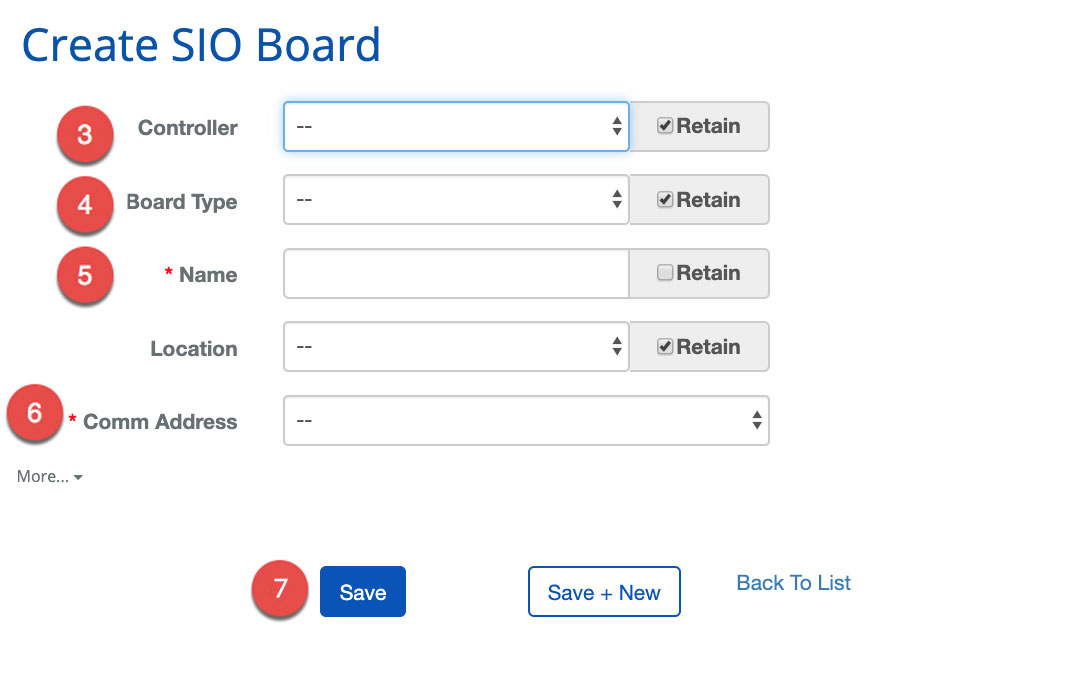
 - First, pick the Controller that will manage the SIO Board.
- Select the proper Board Type from the drop-down menu.
- Next, choose a Name for the SIO Board.
- ***Note:***Using good names can make the process of servicing and debugging much easier.
- Enter the Comm Address assigned to the SIO Board.
- Additional info on addressing the SIO Boards can be found in our Controller Hardware Configuration guide.
- Confirm the entry with the
 button or because of the nature of this job we provide a
  button to move onto the next entry quickly.
- ***Note:***There are many more ways to configure an SIO Board. More...
 option will expand these options which should only be explored by well-trained technicians.