Creating a Procedure
Overview
Procedures are where we combine Triggers and Commands to build IF THIS > THEN THIS logic in BluSKY. These Procedures are incredibly helpful for defining certain behavior of the access control system.
How To Create a Procedure
- Log in and navigate to Procedures. Main Menu-> Setup-> System Setup-> Procedures-> Create
- Use the
 icon in the lower left side to create a new Procedure.
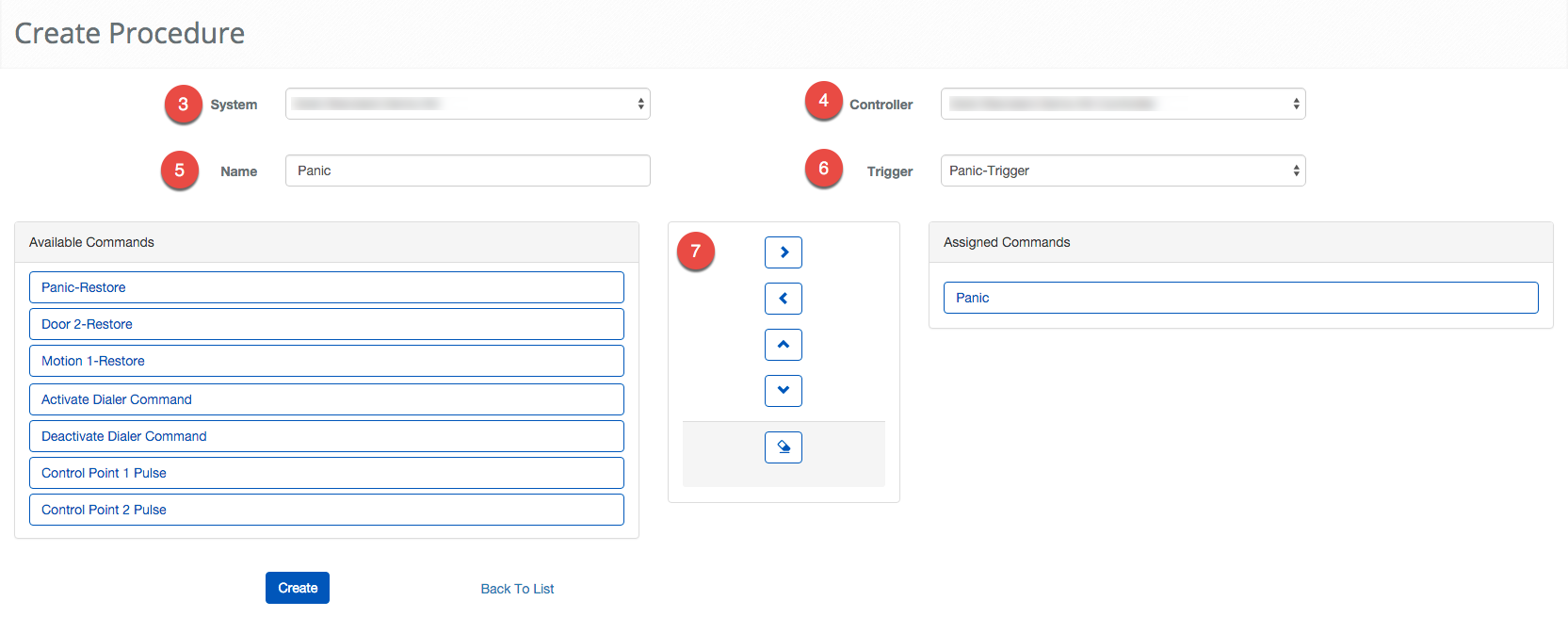
- Using the System drop down select the System for the Procedure.
- Select the the Controller using the drop down menu.
- Next,Give the Procedure a Name.
- Select the Trigger you want to initiate the Procedure.
- Next, we will add the Commands to the Procedure. Click the Command then using the Assign Command button
 move the Command from the left to the right column.
- You can undo by selecting the misplaced Command and using the
 button.
- When finished use the
 button to finish.