7 - Incident Response Gap Map
A practical tool for turning assessment results into a prioritized, actionable modernization roadmap.
Overview
Up to this point in the Incident Response Readiness Kit, you’ve assessed your environment through:
- The Self-Assessment Scorecard (0-30)
- The Seven Evidence Sources
- The Timeline Reconstruction Template
- The Leadership Evaluation Questions
- The Top 5 Lessons for 2025
Now it’s time to turn your findings into a clear action plan.
The Incident Response Gap Map helps you:
- Visualize readiness across categories
- Pinpoint critical vulnerabilities
- Prioritize improvements
- Guide budget decisions
- Align stakeholders
- Establish a 30-, 60-, and 90-day roadmap
When used effectively, the Gap Map becomes the foundation of your modernization strategy.
What the Gap Map Measures
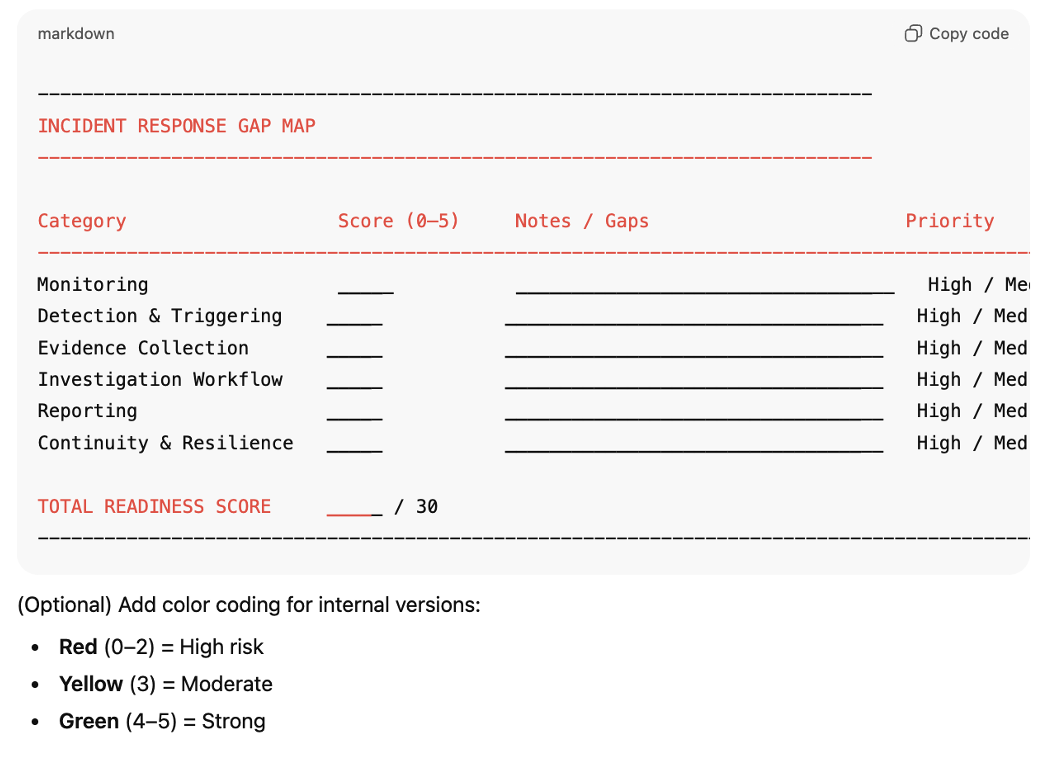
The Gap Map consolidates your readiness across six key categories:
- Monitoring
- Detection & Triggering
- Evidence Collection
- Investigation Workflow
- Reporting
- Continuity & Resilience
These map directly to the Scorecard (Article 2). Each category influences your ability to respond quickly, accurately, and consistently to incidents.
Why the Gap Map Matters
Most organizations know they have gaps - but they cannot explain:
- Where the gaps are
- How severe they are
- Their operational impact
- Their risk impact
- Their cost impact
- How to fix them
- What to prioritize first
The Gap Map gives you a single-page, visual snapshot that brings all of this into focus.
How to Use the Gap Map
Here is the recommended process:
Step 1 - Transfer Your Scorecard Results
Take your 0-5 scores for each category and enter them into the Gap Map table.
Example:
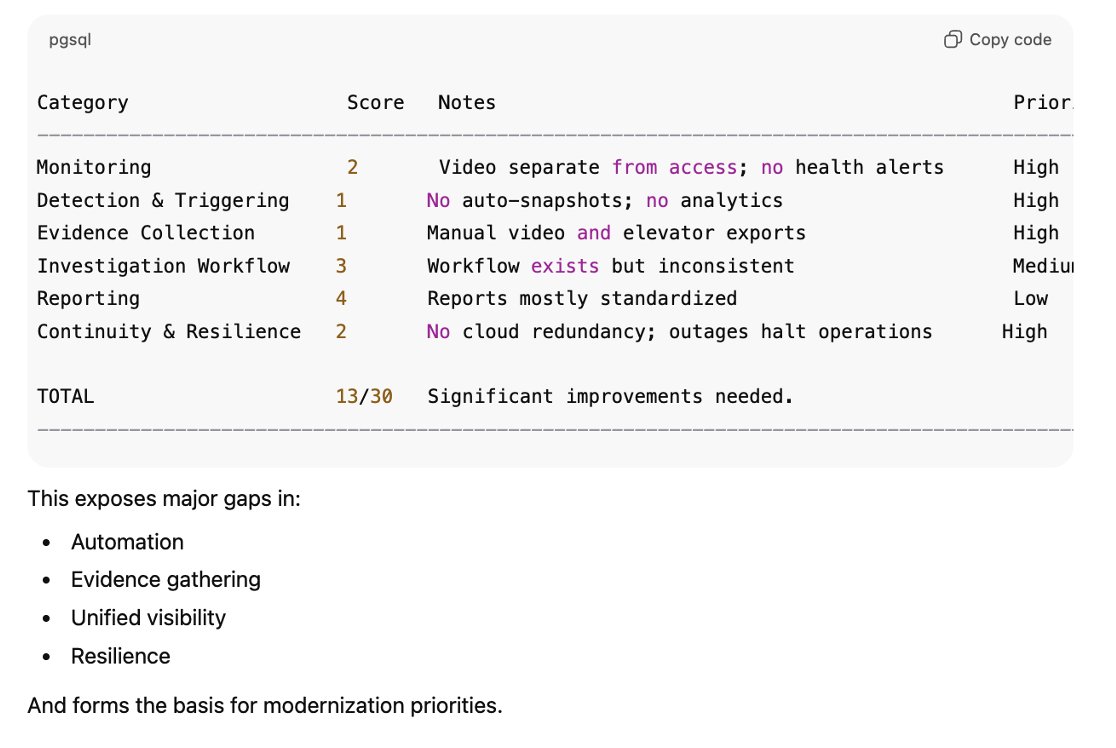
| Category | Score | Notes | Priority |
| Monitoring | 2 | Video in separate system | High |
| Evidence Collection | 1 | Manual video export | High |
| Reporting | 4 | Partially automated | Medium |
Step 2 - Document What’s Missing
Use short notes like:
- “Elevator logs unavailable”
- “Video not time-synced”
- “No automatic snapshots”
- “Reports vary by operator”
- “No failover / cloud redundancy”
This distills complex technical issues into clear operational insights.
Step 3 - Assign a Priority Level
Use High / Medium / Low:
High Priority
Gaps that create significant:
- Response delays
- Liability
- Audit failures
- Operational confusion
- Customer/tenant complaints
Examples:
- No unified video + access
- Missing elevator integration
- No automated evidence
- No cloud redundancy
Medium Priority
Gaps that slow operators but do not prevent response entirely.
Examples:
- Semi-manual reporting
- Limited analytics
- Inconsistent operator training
Low Priority
Nice-to-have improvements.
Examples:
- Cosmetic UI updates
- Wish-list integrations
- Edge-case workflow refinements
Step 4 - Build a Roadmap
Once the Gap Map is complete, convert it into a 30-, 60-, and 90-day plan.
30-Day Plan (Stabilization)
Focus on:
- Monitoring improvements
- Basic automation
- Adding snapshots
- Standardizing reporting
60-Day Plan (Modernization)
Focus on:
- Unifying systems
- Integrating elevators
- Adding AI analytics
- Improving evidence workflows
90-Day Plan (Optimization)
Focus on:
- Full automation via BluSKY
- Incident bundle standardization
- Portfolio-wide consistency
- Role-based workflows
The Official BluBØX Incident Response Gap Map Template
What a Completed Gap Map Looks Like (Example)
How BluSKY Reduces Every Major Gap Category
- Monitoring → Unified access, video, elevators, alarms
- Detection → SceneIT + BluEYES triggers
- Evidence → SummarEYES auto-collection
- Workflow → Standardized across operators
- Reporting → Automated incident bundles
- Continuity → Cloud-native failover
BluSKY upgrades your readiness across all six categories-often immediately.
Next Step
Proceed to Article 8 - How BluSKY Automates Incident Response, which shows how SceneIT, BluEYES, and SummarEYES deliver complete incident automation from the moment an event occurs.