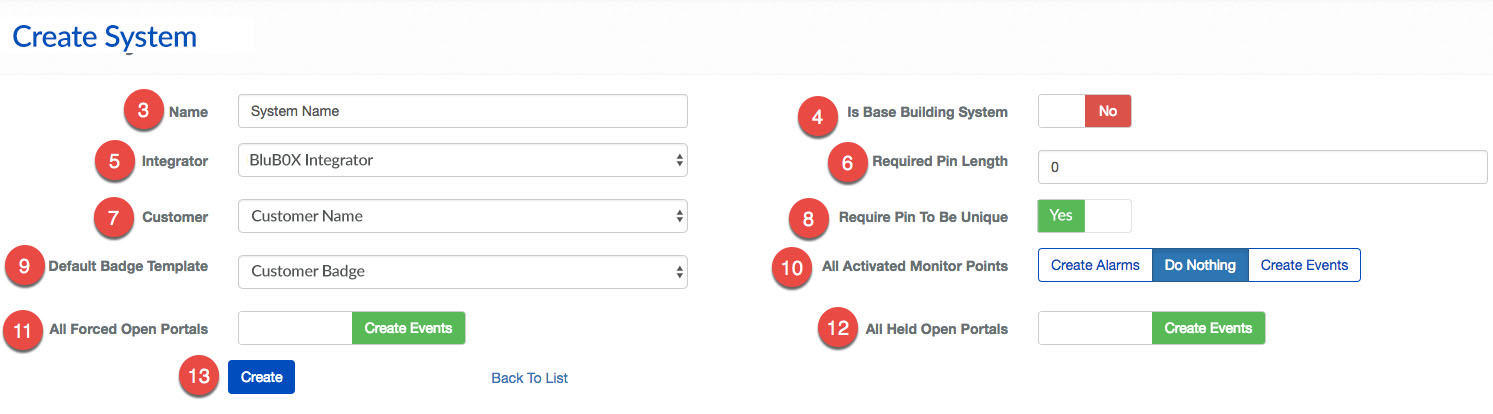
Create a System
BluSKY URL: https://blusky.blub0x.com/en-US/ACSystem/Create
Overview
The System is the base unit for configuring an access control system. This article provides instructions on how to configure a new System for BluSKY.
Instructions
- Log in and navigate to Systems. Main Menu-> Setup-> System Setup-> System-> Create
- Use the
 icon in the lower left side to create a new System.
 - Enter the Name of the System.
- Use the toggle to indicate if the this System is the Base Building System.
- **Note:**While not required it can make administration easier in the future.
- Select the Integrator responsible for the System from the drop down menu.
- **Optional:**Specify the required PIN length.
- Select the Customer.
- **Optional:**Use the toggle to indicate if PIN should be unique.
- **Optional:**Specify a Default Badge Template.
- Determine the default behavior of the Monitoring Points of the System.
- Note: This setting will only be applied when Monitoring Points inherit their behavior. For more, see our guide on Inherited Monitoring Point Behavior
- Set the default behavior for Forced Open Portal events.
- **Note:**Forced Open and Held Open events will always create events. For more on the benefits of each configuration see, Forced Open and Held Open Alarms and Events
- Set the default behavior for Held Open Portal events.
- When finished use the
 button to finish.