September 15, 2026
Visitor & Vendor Management Enhancements
These enhancements provide administrators with greater control and flexibility over Visitor & Vendor notification workflows, allowing notifications to be directed to the appropriate recipients and distribution groups while providing granular control over the types of notifications that are generated.
a. Extended Notification Recipients
Visitor and Vendor notifications can now be sent to additional recipients beyond the host like Receptionist and to a distribution list.
b. Receptionist Global Role
A new Receptionist Global Role has been introduced. When the Receptionist role is assigned to a user profile, that user can receive Visitor/Vendor notifications for the scoped building or occupancy based on the configured notification settings.
c. New Recipient Toggles
The following toggles have been added to control notification recipients:
- Enable Host Notification: Enables or disables notifications to the Visitor/Vendor host.
- Enable Receptionist Notification: Enables or disables notifications to users assigned the Receptionist global role.
- Distribution List Notification: Enables or disables notifications to the configured distribution list.
d. New Notification Trigger Toggles
Additional toggles have been introduced to provide control over which notifications are triggered:
- Enable Visitor Invitation Email: Controls whether the Visitor Invitation email notification is sent.
- Enable Check-In & Check-Out Notification: Controls notifications triggered when a visitor checks in or checks out.
- Enable Pre-Registration Invite Notification: Controls whether the Pre-Registration Invite notification is sent.
H.265 (HEVC) Video Support — BBNVR-AVMS Recorders
a. Introduction
BluSKY now supports H.265 (HEVC) video for BBNVR-AVMS recorder types, with controls at the System, Recorder, and Camera levels.
Why H.265:
- H.265 is the successor to H.264 and delivers the same picture quality using significantly less data. Compared to H.264:
- Reduced disk space — recordings consume 50% less storage for the same quality, so the same disk holds a longer retention period.
- Smoother streaming — lower bandwidth per stream means smoother live and playback video, especially on higher-resolution cameras and constrained networks.
- The H.265 control is set to OFF by default. It must be explicitly enabled before H.265 streaming is used.
- This applies to BBNVR-AVMS recorder types only. Other recorder types are unaffected by these settings.
- Existing sites continue to run on H.264 with no change in behavior until H.265 is turned on.
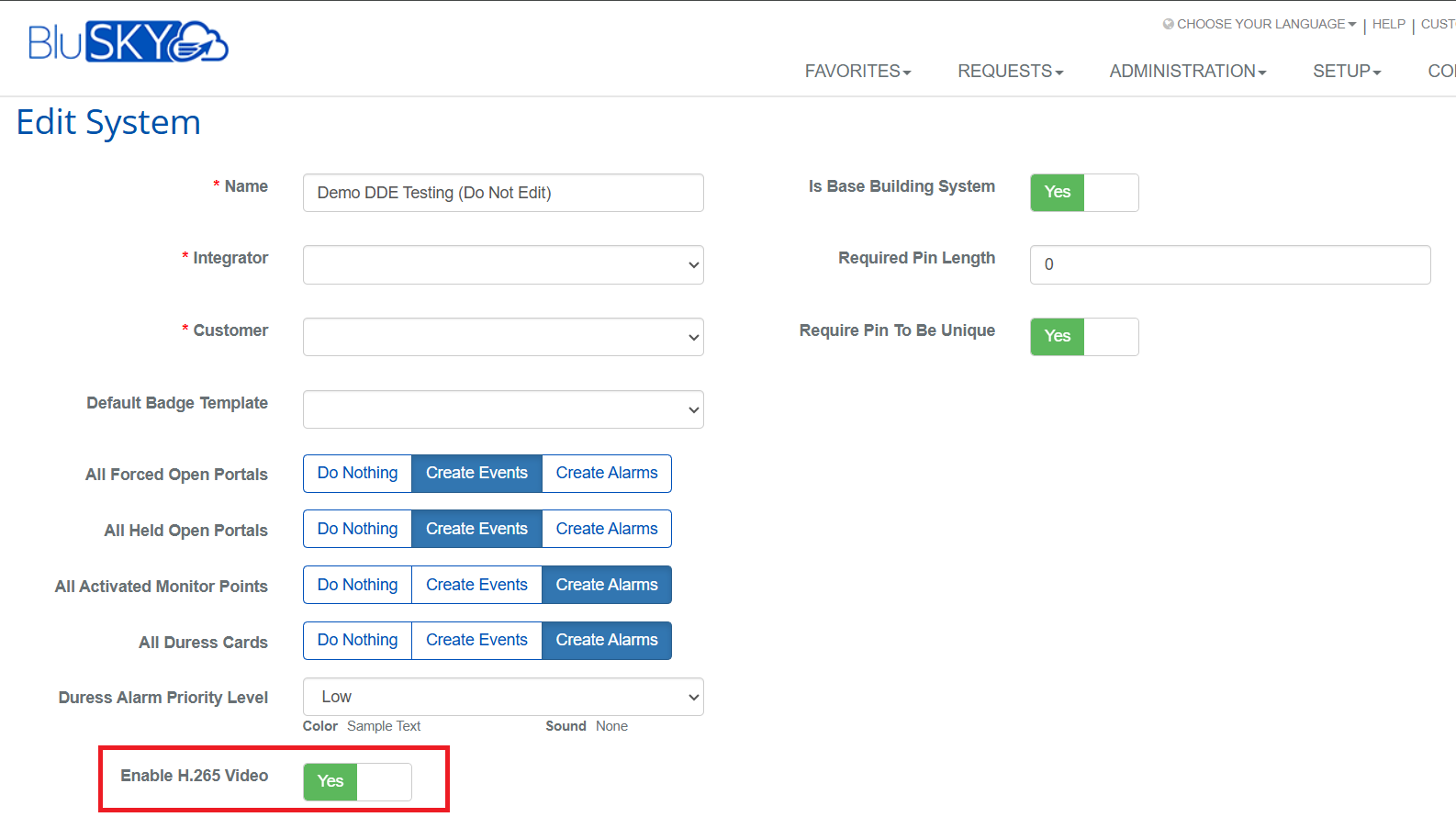
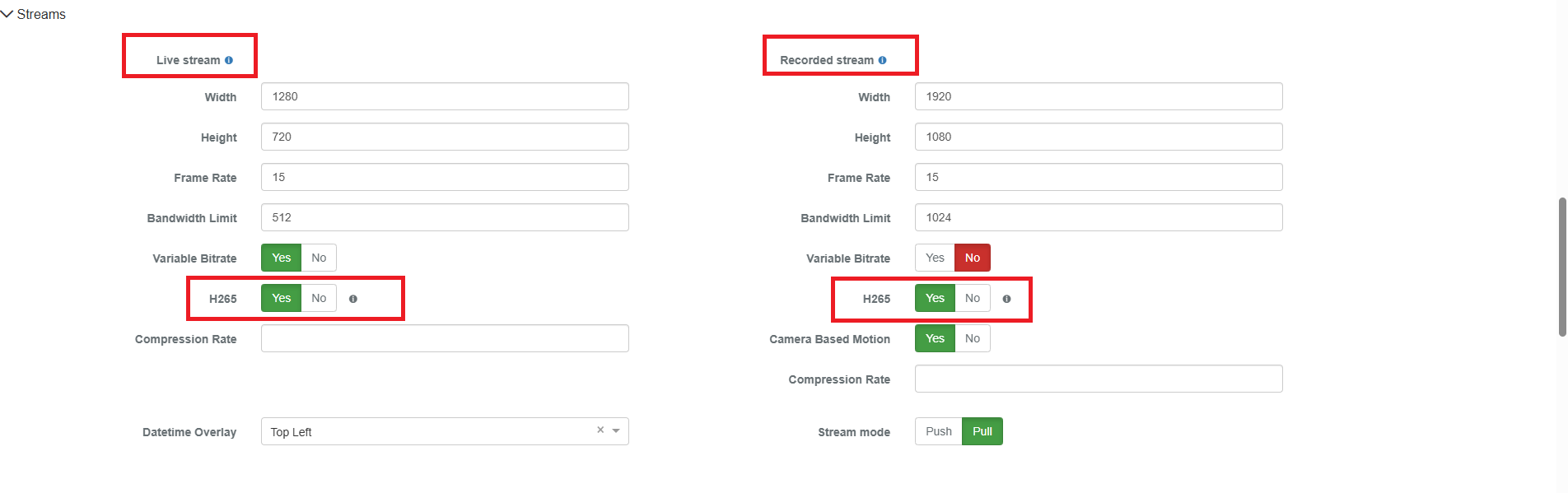
- H.265 is enabled top-down: System → Recorder → Camera. The camera-level setting only takes effect when H.265 is enabled at the System and Recorder levels above it.
- Live stream and Recorded stream are enabled independently at the camera level, so a camera can run H.265 live and H.264 recording, or any other combination.
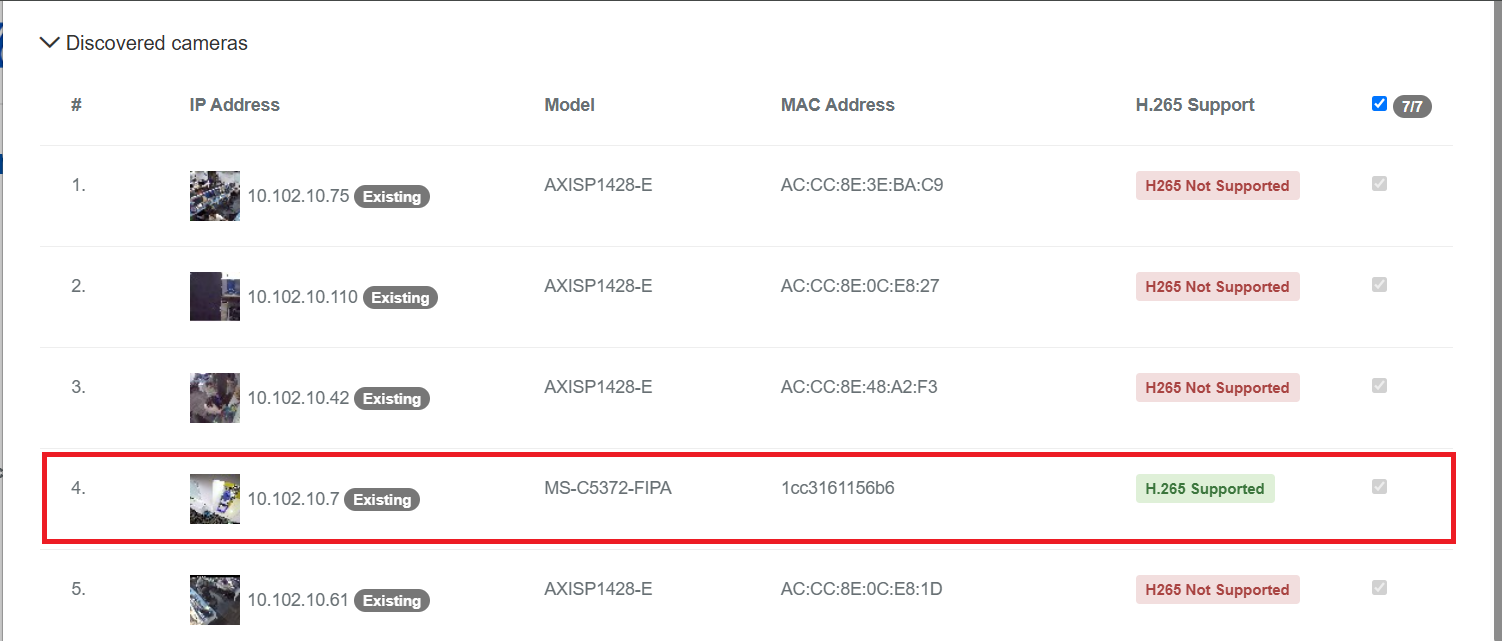
- Only cameras that report H.265 Supported can be switched. Cameras marked H265 Not Supported remain on H.264.
b. H.265 Video Support Controls
Added H.265 video support controls at the System, Recorder, and Camera levels.
System:
Recorder:
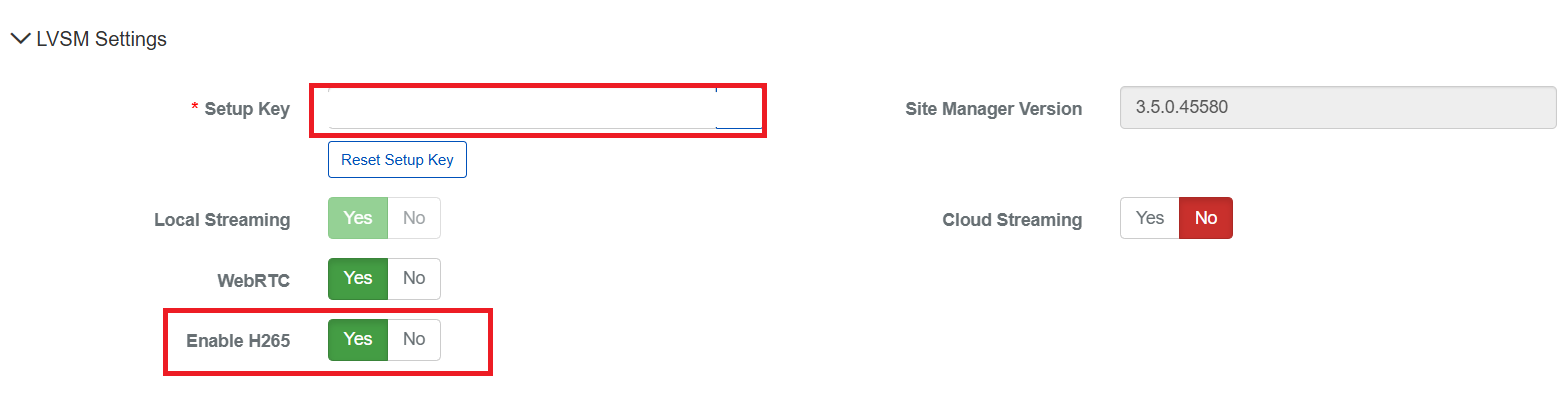
Camera:
c. H.265 Support Indicators
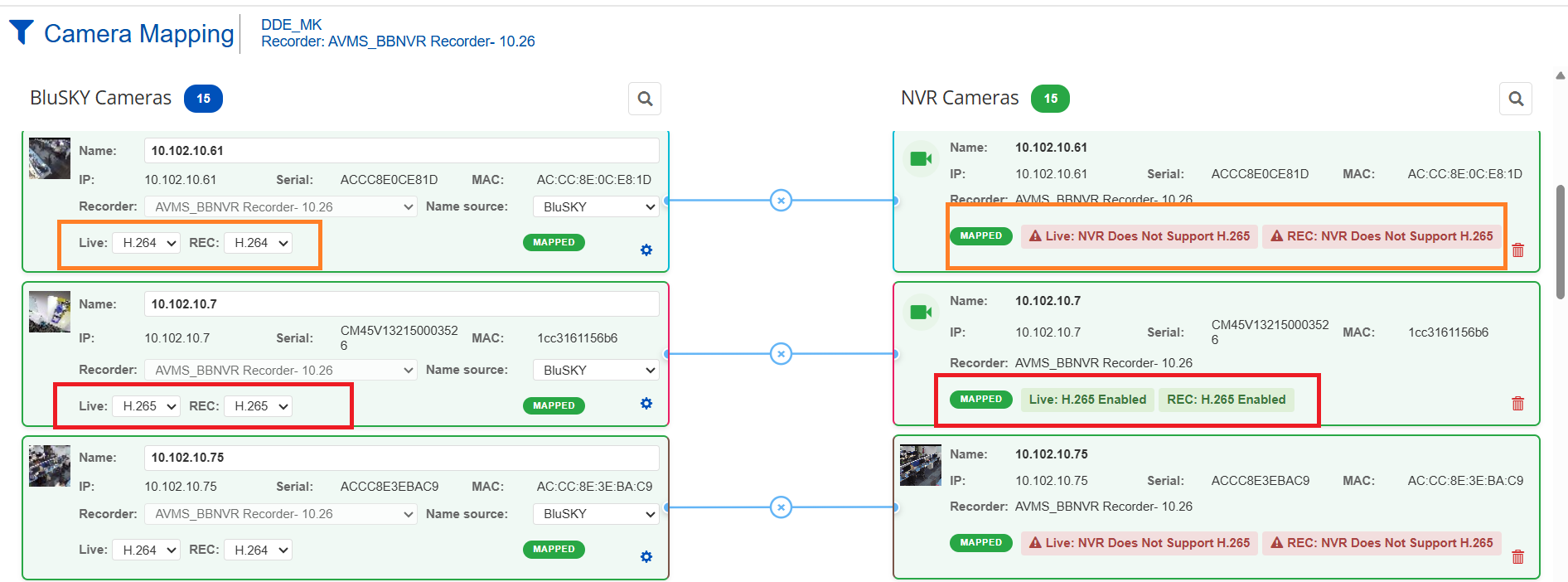
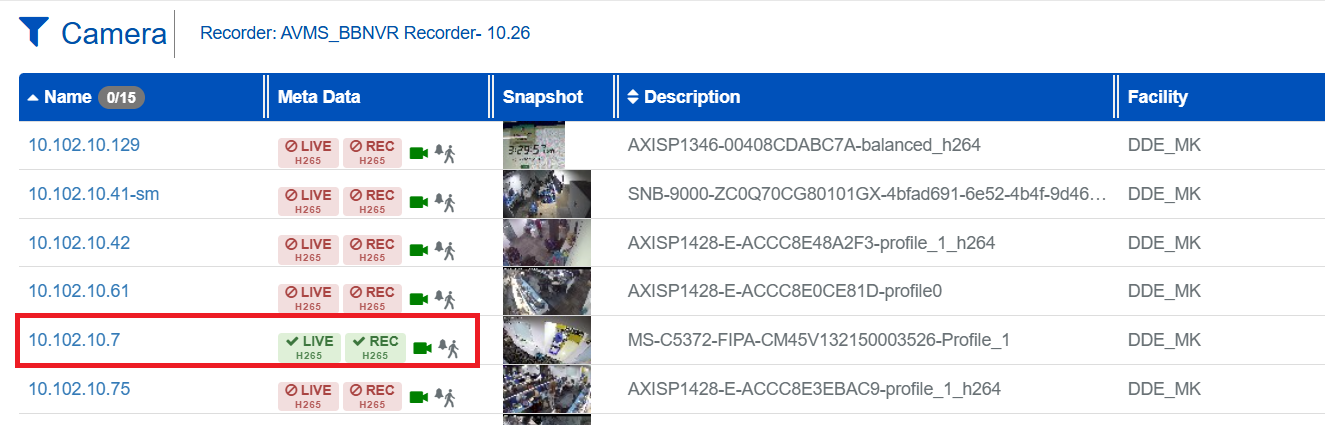
Added H.265 support indicators across Camera Discovery, Mapping, and Camera View List pages, making camera compatibility easier to identify.
Discover Cameras:
Camera Mapping:
Camera View List Page:
d. Enhanced Live and Playback Video Controls
Enhanced live and playback video controls to support H.265 streams from BBNVR cameras.
Camera Discovery Enhancements
a. Improved UI and Usability
Improved the Camera Discovery experience with UI and usability enhancements.
b. Snapshot Support
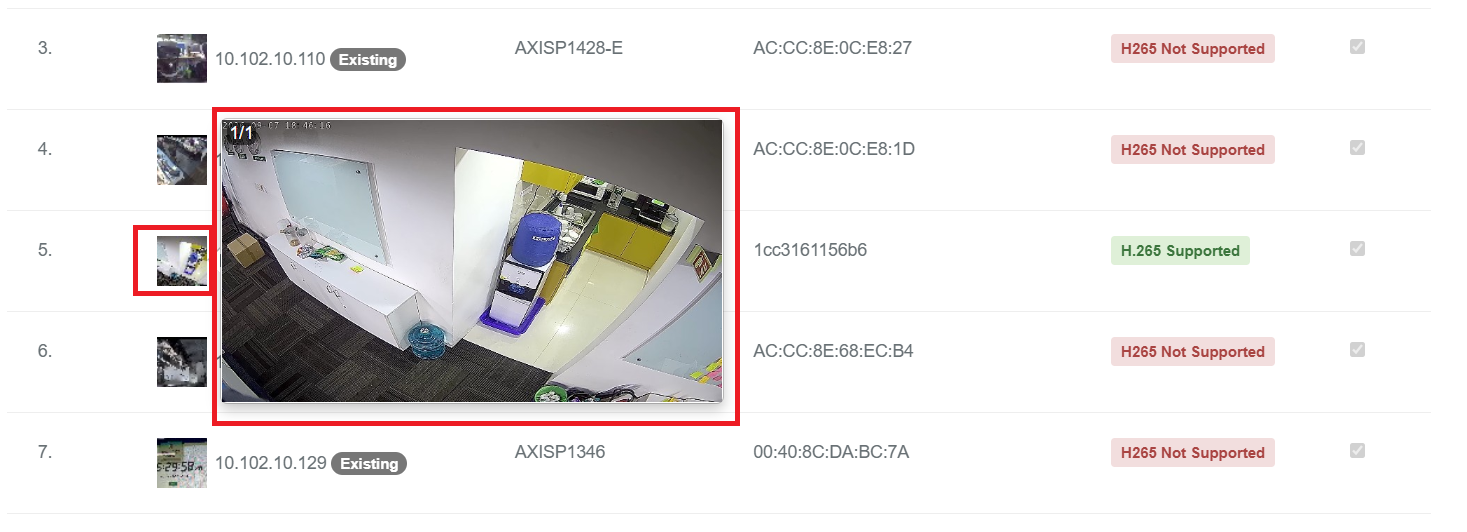
Added snapshot support on Camera Discovery and Mapping pages to make camera identification easier.
Discover-Camera Snapshot Implementation:
Camera-Mapping Snapshot Implementation:

c. Improved Camera Information Handling
Improved handling of camera information and available video options during discovery and mapping.
BBNVR Camera Management
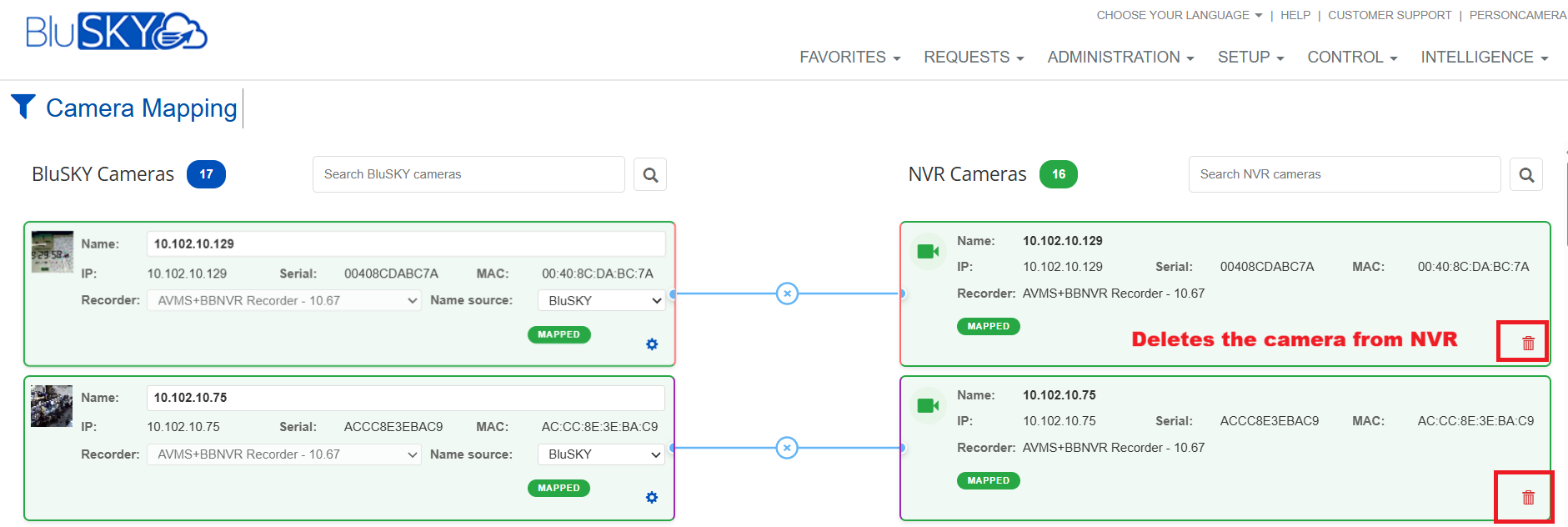
a. Delete NVR Cameras
Added the ability to delete NVR cameras associated with BBNVR recorders. Deleted cameras are also removed from the NVR.
b. Enhanced Camera ROI Configuration
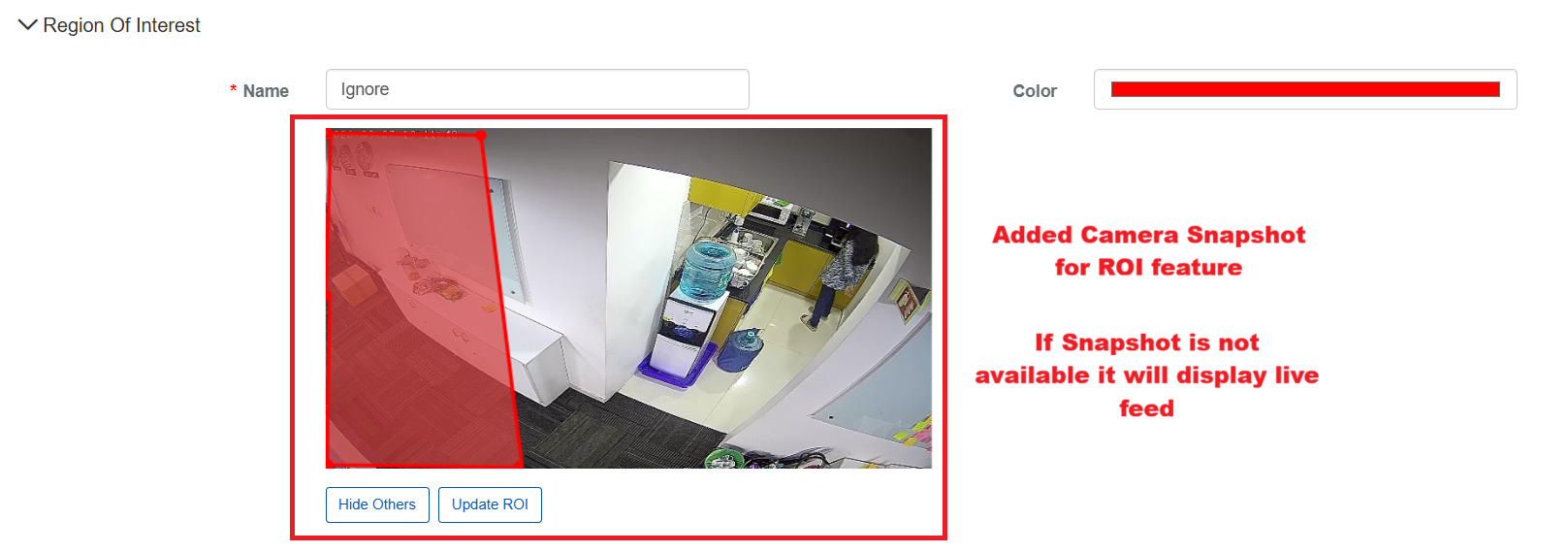
Enhanced Camera ROI configuration to display either a snapshot or video, based on availability.
Video Player Improvements
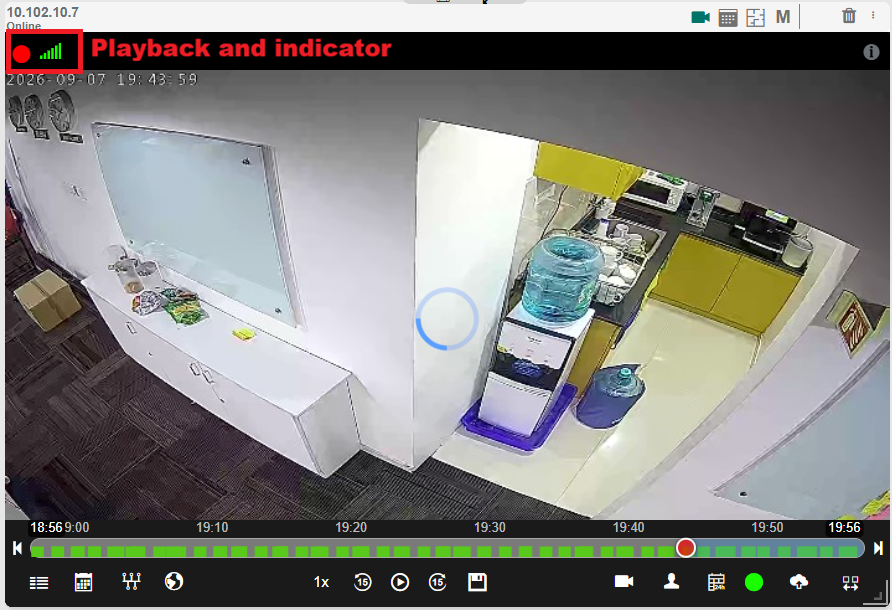
a. Unified Stream Quality and Route Indicator
- Previously the player displayed a separate label for each combination of codec and route — H.264 Cloud, H.264 Local, H.264 WebRTC, and the equivalent set for H.265. These have been replaced by a single indicator in the player.
- The indicator shows overall stream status and quality at a glance.
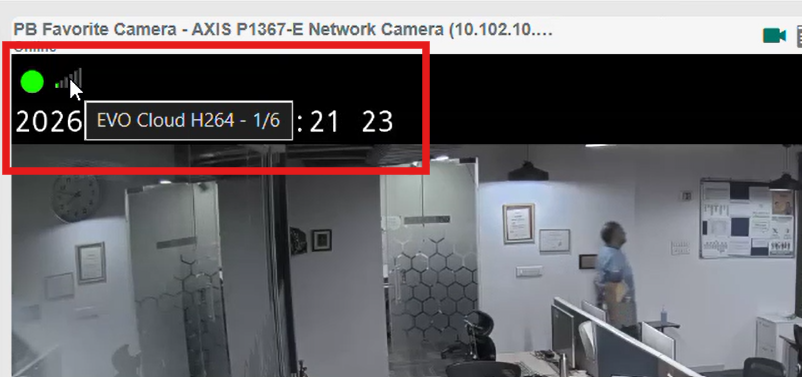
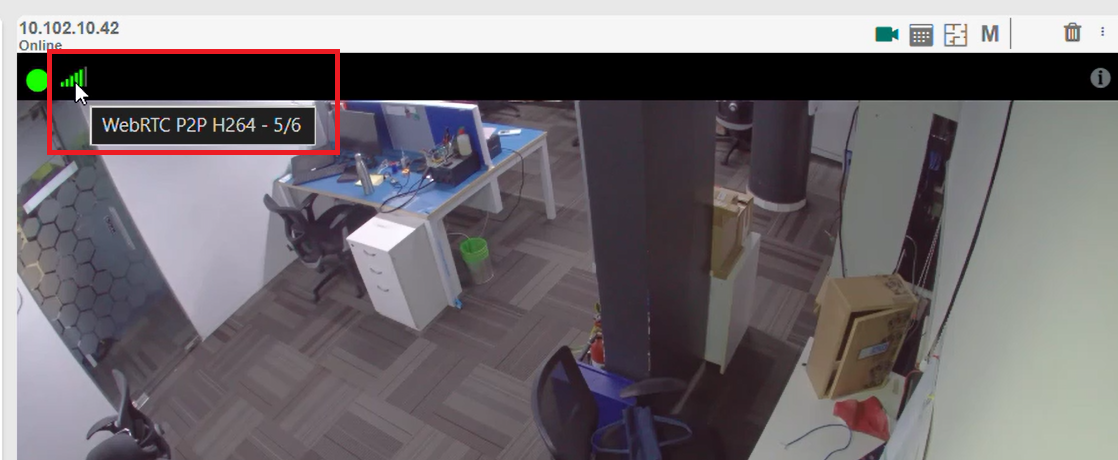
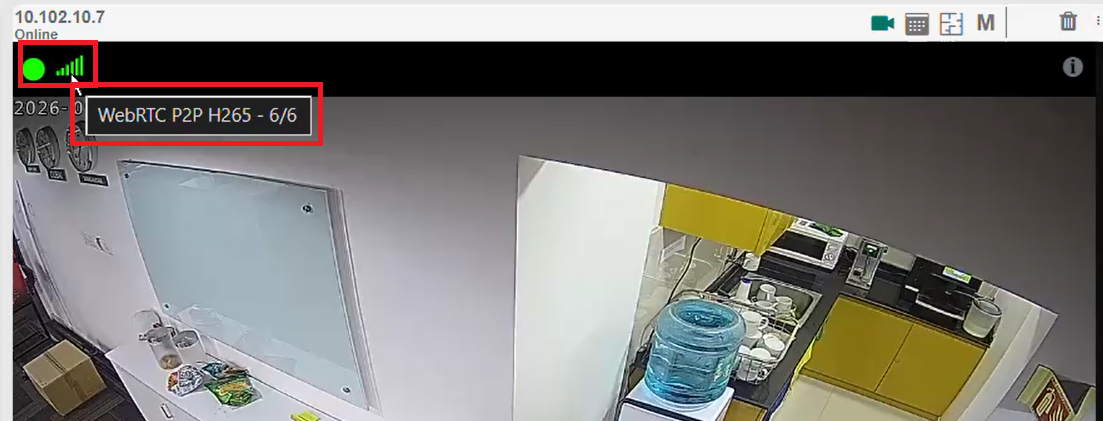
- Hovering over the indicator displays the full streaming detail: route, codec, and quality level — for example EVO Cloud H264 - 1/6, WebRTC P2P H264 - 5/6, or WebRTC P2P H265 - 6/6. This gives a consistent view of stream status across all recorder types and codecs, without cluttering the player with multiple labels.
Milestone Evo Cloud H264 Indicator:
BBNVR WebRTC P2P H264 Indicator:
BBNVR WebRTC P2P H265 Indicator:
b. H.265 Browser Not Supported
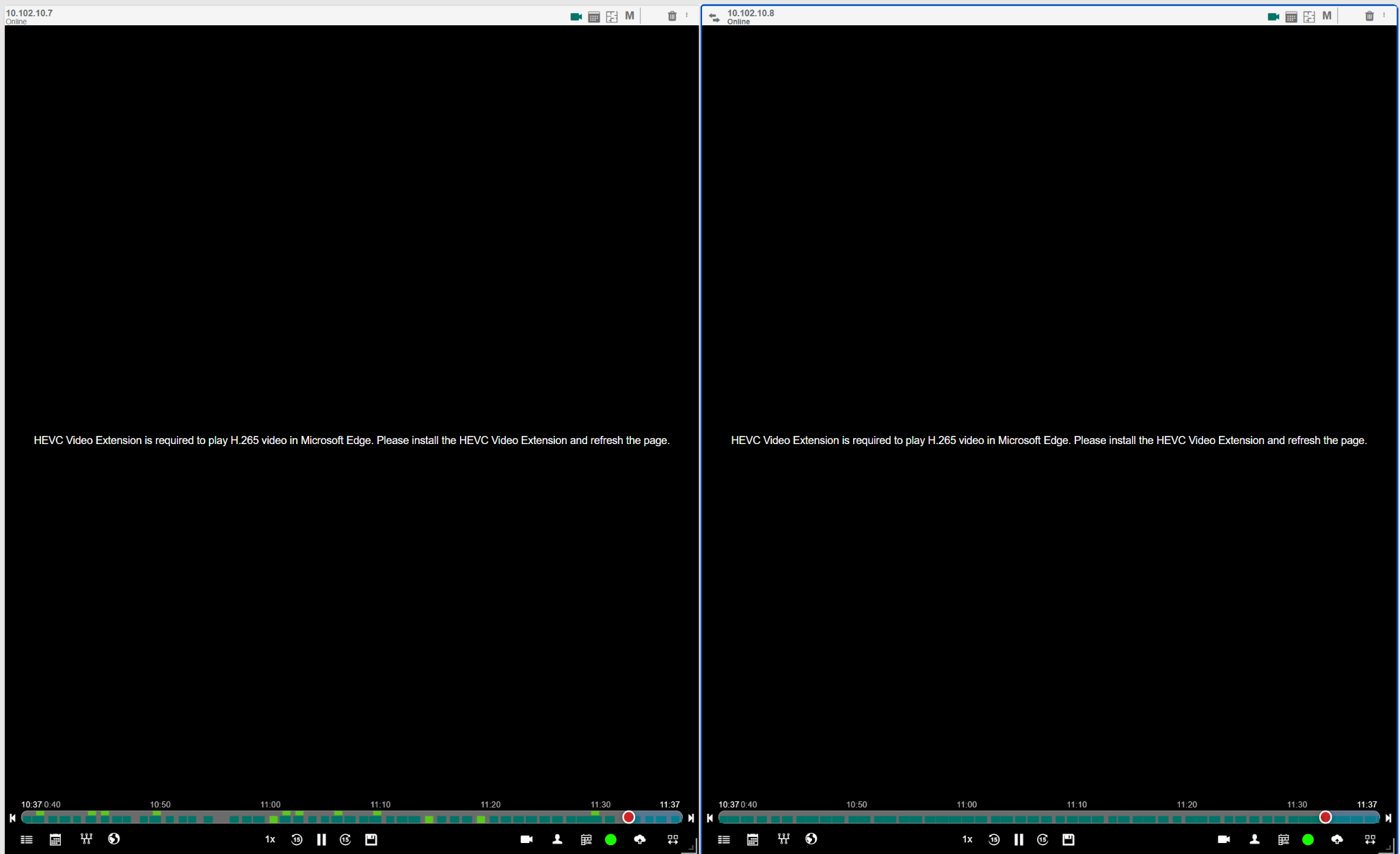
H.265 video is not natively supported in Microsoft Edge. To view H.265 camera streams in the browser, users must install the HEVC Video Extension and refresh the page. Until it is installed, the player displays a message in place of the video.
c. Improved H.265 Live and Playback Handling
Improved H.265 live and playback handling for supported BBNVR cameras.
Snapshot Display Improvements
Fixed snapshot display issues for portrait and square aspect-ratio images, ensuring images are displayed correctly without unwanted stretching or cropping.
Events Timeline
Fixed an issue with the Events Timeline time block. After selecting a time block from the Global Events Time Block drop-up, the drop-up now closes automatically, providing a smoother and more intuitive experience.
Schedule Expiry Handling Improvements
Fixed schedule expiry handling to ensure expired snapshots are fully removed and no longer appear as blank images in the UI.
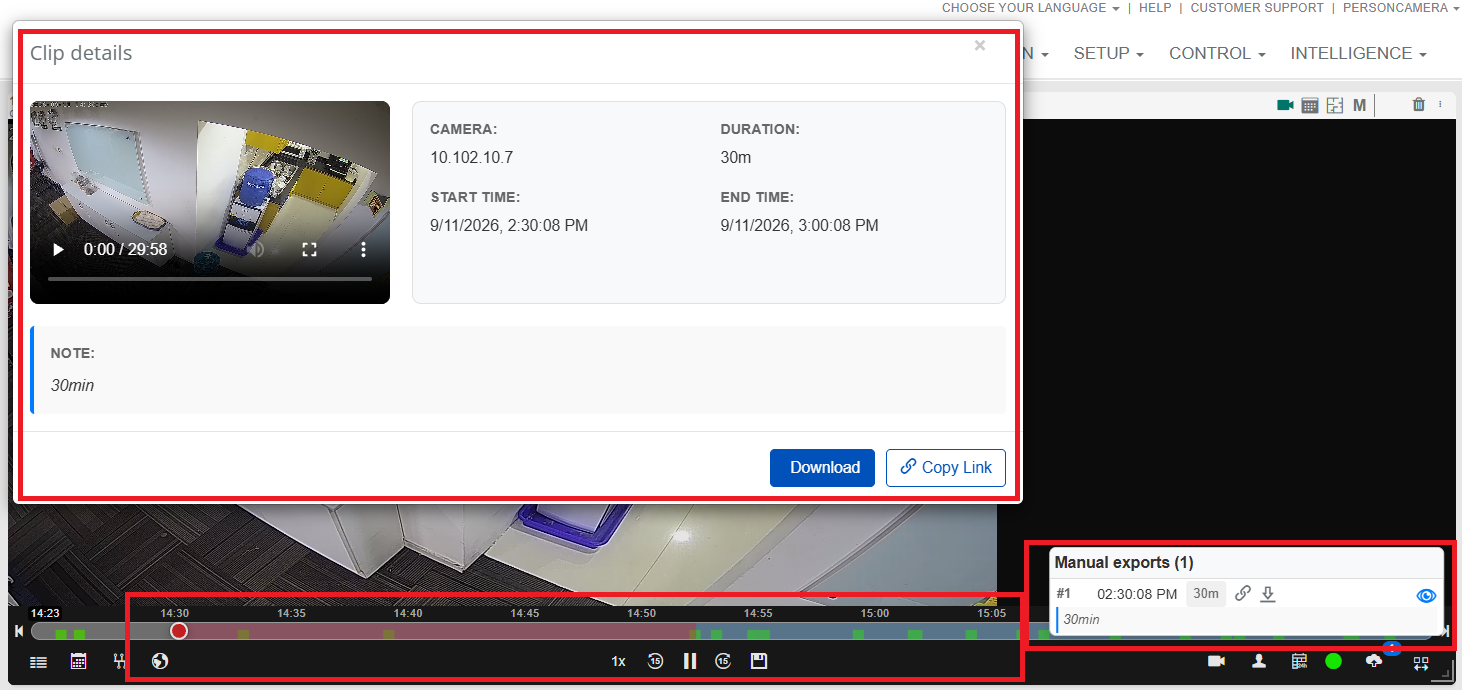
Export Clip — Up to 30 Minutes — Support BBNVR-AVMS
Added support for exporting video clips of up to 30 minutes from BBNVR, for review, investigation, and archival purposes.
Motion Detection on Camera — Support BBNVR-AVMS
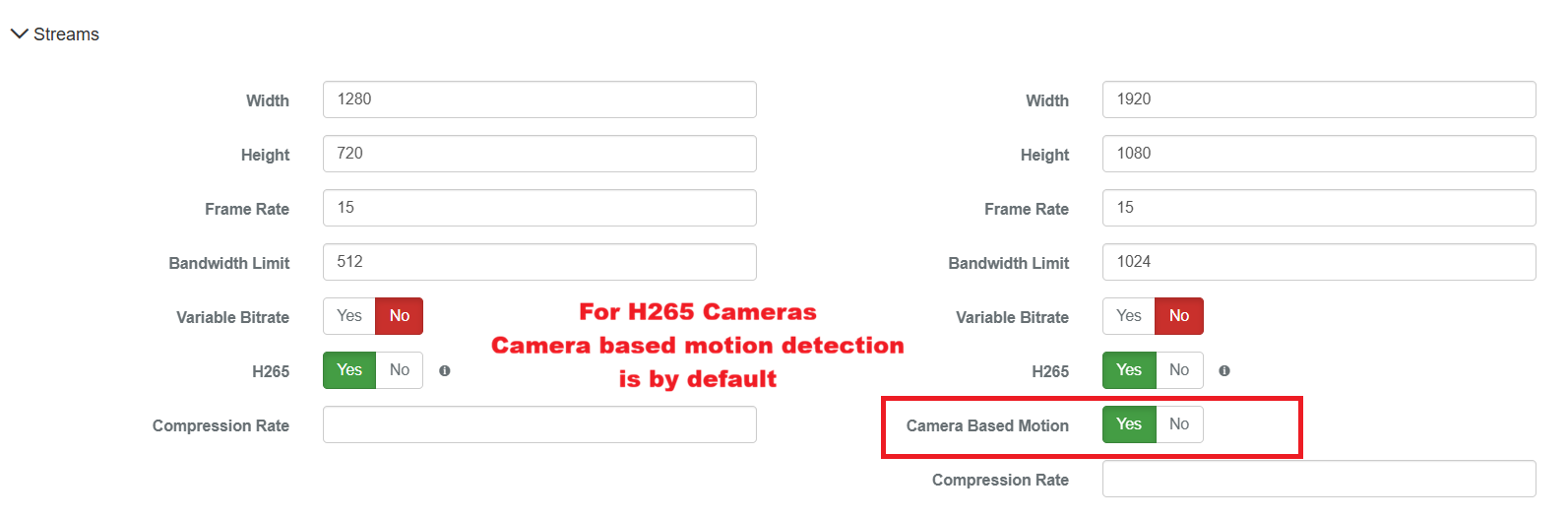
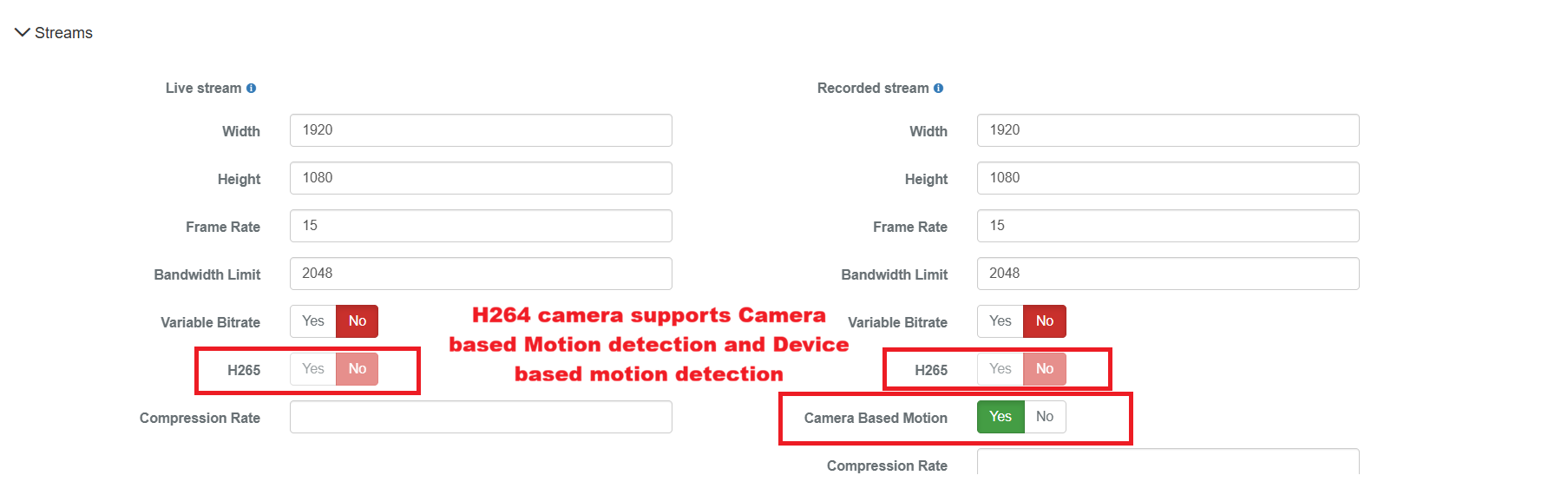
- Implemented Camera-Based Motion Detection, allowing supported cameras to detect motion directly and reducing CPU load on the recorder.
- H.265 cameras use camera-based motion detection by default. H.264 cameras support either device-based or camera-based motion detection.
- Enabled per camera using the Camera Based Motion control on the Edit Camera page.
- ROI limit based on the camera model.
H265 Camera Based Motion Detection:
H264 Camera Based Motion Detection:
Support HTTPS Camera Network Protocol — Support BBNVR-AVMS
The NVR should support cameras configured with the HTTPS network protocol for camera communication, live streaming, recording, and configuration.
Automatically Handle Camera IP Address Changes — Support BBNVR-AVMS
- When the camera IP address changes, the NVR should automatically detect and handle the updated IP address.
- The camera should not need to be removed and added to the NVR again.
- Existing camera configuration, recording, and live streaming should continue to work with the updated IP address.