Controller Diagnostics
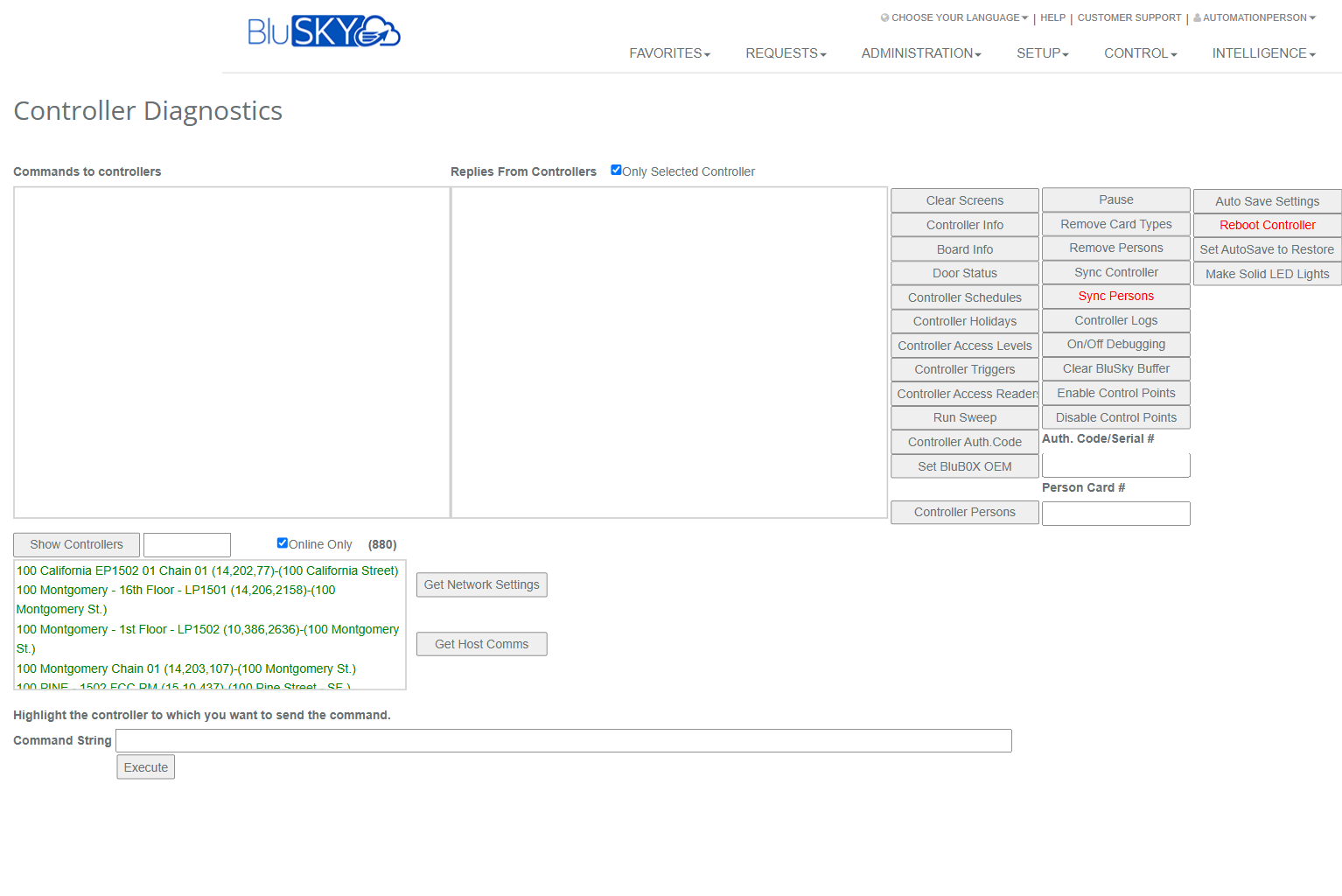
Controller Diagnostics Screen
Screen Overview
The Controller Diagnostics screen provides real‑time tools to query, test, and service connected access controllers. Administrators can send diagnostic commands, view controller replies, and perform maintenance actions such as syncing data, reviewing logs, and rebooting devices. Use this screen during commissioning, troubleshooting, and ongoing health checks of controllers.
Field Definitions
| Field Label | Definition | Notes |
|---|---|---|
| Commands to controllers | Live queue showing the commands that have been issued to controllers. | Read‑only. Use Clear Screens to clear the pane. |
| Replies From Controllers | Live feed of responses returned by controllers. | Read‑only. Filter with Only Selected Controller. |
| Only Selected Controller | Limits the Replies pane to messages from the highlighted controller. | Checked by default in some environments. |
| Online Only | When checked, lists only controllers currently online. | The count in parentheses shows how many match. |
| Show Controllers | Displays or refreshes the list of available controllers. | Click to repopulate after network changes. |
| Controller list | Scrollable list of controllers. Click one to highlight/select it. | Most actions operate on the highlighted controller. |
| Get Network Settings | Requests network configuration from the selected controller. | Displays results in Replies pane. |
| Get Host Comms | Requests host communication status from the selected controller. | Useful for connectivity troubleshooting. |
| Command String | Free‑form command text for advanced diagnostics. | For integrator use; format depends on controller type. |
| Execute | Sends the Command String to the highlighted controller. | Disabled if no controller is selected or field is empty. |
| Clear Screens | Clears both Commands and Replies panes. | Does not affect controller state. |
| Pause | Temporarily stops auto‑scroll/updates in the panes. | Useful when reviewing long logs. |
| Auto Save Settings | Sends instruction to save current controller configuration to flash. | Persist settings through power cycles. |
| Reboot Controller | Performs a soft reboot of the selected controller. | Connection will drop and re‑establish; use with caution. |
| Remove Card Types | Clears card format/type definitions from the controller. | Typically followed by Sync Controller to republish formats. |
| Remove Persons | Removes all person/credential records from the controller. | Irreversible on device; republish with Sync Persons. |
| Set AutoSave to Restore | Sets controller to automatically restore last saved configuration. | Used with Auto Save Settings for resilience. |
| Make Solid LED Lights | Forces controller/reader LEDs to solid state for testing. | Behavior depends on reader model. |
| Controller Info | Queries controller model, firmware, and status. | Replies pane shows details. |
| Board Info | Queries downstream board information (I/O, reader boards, etc.). | Availability varies by hardware. |
| Door Status | Requests current status of doors/inputs managed by the controller. | Useful for live diagnostics. |
| Sync Controller | Publishes core configuration (card formats, doors, schedules, etc.). | Scope may vary by system configuration. |
| Sync Persons | Publishes person/credential data to the controller. | Respects access levels and activation dates. |
| Controller Schedules | Requests active schedules programmed on the controller. | For verification/audit. |
| Controller Holidays | Requests holiday sets programmed on the controller. | For verification/audit. |
| Controller Access Levels | Requests access level assignments known by the controller. | Compare with cloud configuration. |
| Controller Logs | Requests event/diagnostic logs from the controller. | May paginate for large volumes. |
| On/Off Debugging | Toggles verbose debug output from the controller. | Use only during troubleshooting. |
| Controller Triggers | Requests configured triggers/links on the controller. | For verification/audit. |
| Clear BluSky Buffer | Clears queued messages in the cloud-to-controller buffer for this device. | Use if messages appear stuck. |
| Enable Control Points | Enables output/control points managed by the controller. | Often used after testing. |
| Disable Control Points | Disables output/control points for safe testing. | Temporarily suppresses actions. |
| Run Sweep | Initiates a controller poll/sweep of downstream devices. | Helps detect missing boards. |
| Controller Auth.Code | Sends the authorization code/serial to pair or re‑authorize the controller. | Requires entry in Auth. Code/Serial # field. |
| Auth. Code/Serial # | Input for the controller authorization code or serial number. | Used with Controller Auth.Code. |
| Set BluBOX OEM | Sets or confirms OEM mode for BluBOX hardware. | For integrator use only. |
| Person Card # | Input to target a single credential when syncing persons. | Used with Controller Persons or Sync Persons. |
| Controller Persons | Queries person records currently stored on the controller. | Optionally filtered by Person Card #. |
Screen Actions and Functions
- Select controller: Click a controller in the list to highlight it as the target of all actions.
- Clear Screens: Clears the command and reply panes.
- Pause: Temporarily halts pane updates to aid review.
- Auto Save Settings / Set AutoSave to Restore: Persist configuration and set restore behavior after reboot or power loss.
- Reboot Controller: Soft‑restarts the highlighted controller.
- Controller Info / Board Info / Door Status: Retrieve device, board, and door/input state information.
- Sync Controller: Republish configuration items to the device.
- Sync Persons: Republish person/credential records to the device.
- Remove Card Types / Remove Persons: Purge data from the device prior to republishing.
- Controller Schedules / Holidays / Access Levels / Triggers: Retrieve specific configuration sets for audit.
- Controller Logs: Pull diagnostic or event logs for analysis.
- On/Off Debugging: Toggle verbose debug output.
- Clear BluSky Buffer: Clear pending cloud‑to‑device queue for the selected controller.
- Enable Control Points / Disable Control Points: Toggle output points.
- Run Sweep: Poll downstream hardware to discover or verify boards.
- Controller Auth.Code + Auth. Code/Serial #: Pair or re‑authorize the device.
- Make Solid LED Lights: Force steady LED output for reader testing.
- Get Network Settings / Get Host Comms: Request networking and host communication details.
- Command String + Execute: Send an advanced, raw command to the device.
Usage Instructions & Examples
- View a controller’s current status
- Click Show Controllers and ensure Online Only is checked.
- Select the target controller from the list.
- Click Controller Info, then Door Status.
- Review results in the Replies From Controllers pane.
- Republish people to a controller
- Select the target controller.
- Optional: Enter a specific credential in Person Card # to limit the sync.
- Click Sync Persons.
- Confirm completion in the Replies pane and verify no errors are listed.
- Reboot a controller safely
- Select the target controller and ensure any critical operations are complete.
- Click Reboot Controller.
- Wait for the controller to go offline and return online; watch Replies for status messages.
- If configuration changes were made, click Auto Save Settings beforehand to persist them.
- Diagnose communications
- Select the controller.
- Click Get Network Settings and Get Host Comms.
- If messages appear stuck, click Clear BluSky Buffer.
- Use Controller Logs or On/Off Debugging as needed and review Replies.
- Send an advanced command
- Select the controller.
- Enter the required instruction in Command String.
- Click Execute and observe both panes for command/response details.
System Behaviors and Edge Cases
- Actions target the highlighted controller; if none is selected, actions are ignored or disabled.
- Replies pane filtering:
- With Only Selected Controller checked, only messages from the selected device appear.
- Unchecking shows all replies from any device you have permission to view.
- Online Only hides offline devices; toggle off to view all controllers for historical checks.
- Reboot Controller temporarily drops connectivity; expect a brief gap in replies and events.
- Sync Persons publishes only eligible people:
- Inactive people, expired credentials, or those without access tied to the controller are excluded.
- If Person Card # is populated, only that credential is synchronized/queried.
- Remove Persons and Remove Card Types immediately clear device‑resident data; republish with Sync functions afterward.
- Clear BluSky Buffer removes queued outbound messages for the device; use carefully to avoid discarding pending updates.
- Pause stops auto‑scrolling; new data is buffered and displayed when unpaused.
- Some commands (e.g., Controller Logs, Run Sweep) are asynchronous and may take several minutes; buttons may gray out until completion.
- Controller Auth.Code requires a valid value in Auth. Code/Serial #; invalid entries are rejected by the device.
- Hardware/firmware differences may limit availability or change responses of certain commands (e.g., LED control).
Permissions
- Available to Global Administrators, System Integrators, and Tenant Administrators with controller management rights.
- Execute advanced commands, reboot, remove persons/card types, and toggle control points typically require elevated privileges.
- Read‑only users may view Replies but cannot send commands.
Linked Workflows
- Controllers (Setup > Controllers): Configure network, model, and site associations prior to diagnostics.
- Doors and Readers: Define hardware endpoints that appear in Door Status and control point actions.
- People and Credentials: Manage records that are synchronized via Sync Persons.
- Access Levels, Schedules, Holidays: Manage data sets that are audited or published from this screen.
- Event Monitoring: Correlate Controller Logs with live events during troubleshooting.
Reference Image Links